LCP Metric Optimization
Let’s explore the issues you may run into with the Largest Contentful Paint (LCP) metric and how to optimize it as efficiently as possible.
We’ve prepared a set of tips for optimizing the LCP metric. These tips come from our consulting work on speed. We’ll show you how to leverage technologies such as Priority Hints, preload, or native lazy loading.
If you want to learn more, read on or watch the webinar recording:
YouTube: Practical LCP Speed Optimization
Before you start, also check how to correctly find the LCP element. This is essential for further optimizations.
Priority Hints (boosting priority directly on the element)
If the LCP element is an image, you can raise its download priority with Priority Hints. Increase the priority by adding the fetchpriority="high" attribute to the <img> tag. This ensures the image source starts loading with the highest priority, leading to the fastest rendering of that element.
For all other images on the page, add loading="lazy" to the <img> tag. This tells the browser to download and render the resource only when the user scrolls near it.
Don’t forget about images in areas edited via a WYSIWYG editor; they can appear on the page as well.
Also consider carousels and similar multi-image components. If the carousel is an LCP element, give the first image fetchpriority="high" and set loading="lazy" for all subsequent images.
<ul className="carousel">
	<!-- First image in the carousel, increased load priority: -->
	<li><img src="image1.webp" fetchpriority="high" alt="" /></li>

	<!-- Other images in the carousel, lower priority: -->
	<li><img src="image2.webp" loading="lazy" alt="" /></li>
	<li><img src="image3.webp" loading="lazy" alt="" /></li>
</ul>
Support for fetchpriority is already broad. fetchpriority works in all modern browsers except Firefox. More information at web.dev.
Preload (header priority boost)
Similar to Priority Hints, the <preload> tag can be used. preload tells the browser to start downloading a resource as soon as possible. Preload is useful for preloading fonts that are critical for initial rendering:
<link rel="preload" href="/font400.woff2" as="font" type="font/woff2" crossorigin="anonymous" />
<link rel="preload" href="/font500.woff2" as="font" type="font/woff2" crossorigin="anonymous" />
<link rel="preload" href="/font600.woff2" as="font" type="font/woff2" crossorigin="anonymous" />
Preload can be used for fonts, JavaScript files, or images.
The advantage of <preload> is cross-browser support.
If you want to preload images with srcset, you must declare sources in order across all widths; a simpler approach is to use fetchpriority="high" directly on the <img> tag, letting the browser decide which source to fetch first.
Note: <preload> must be placed high in the <head>. Preloading fonts should be at the very top of the head, before the CSS links.
More on properly preparing <preload> can be found at MDN.
Native lazy loading
Using native lazy loading is today standard, as it has broad support across modern browsers. Apply lazy loading to all <iframe> and <img> elements that are not in the initial viewport. This helps the browser efficiently manage loading of these elements.
If you’re using JavaScript lazy loading where <img> tags don’t have a src attribute, the browser won’t know the sources.
<img src="image1.webp" loading="lazy" alt="" />
WebP images
Prepare images in modern formats like WebP and use them across the site, including illustrations. This format offers significant data savings compared to JPG or PNG while preserving quality and speeding up page loads.
Don’t forget to optimize images from WYSIWYG sections prepared by editors.
Manually fine-tune the compression of illustrative images with tools like Squoosh.
Tip: At the time of writing Google introduced the Jpegli library, capable of compressing JPG images up to 35% better than prior libraries, potentially rivaling WebP.
Optimize web fonts
Before deploying web fonts, check their size and consider subsetting to optimize overall size.
If possible, prefer hosting fonts locally on your server, which can significantly improve load speed. For generating local Google font files you can use Google Font Helper.
Always use the WOFF2 format. Other formats are unnecessary. WOFF2 is broadly supported in all modern browsers.
Before deploying font files, verify their content with a tool like [Wakamai Fondue] to understand character counts and other details for optimal font selection and configuration.
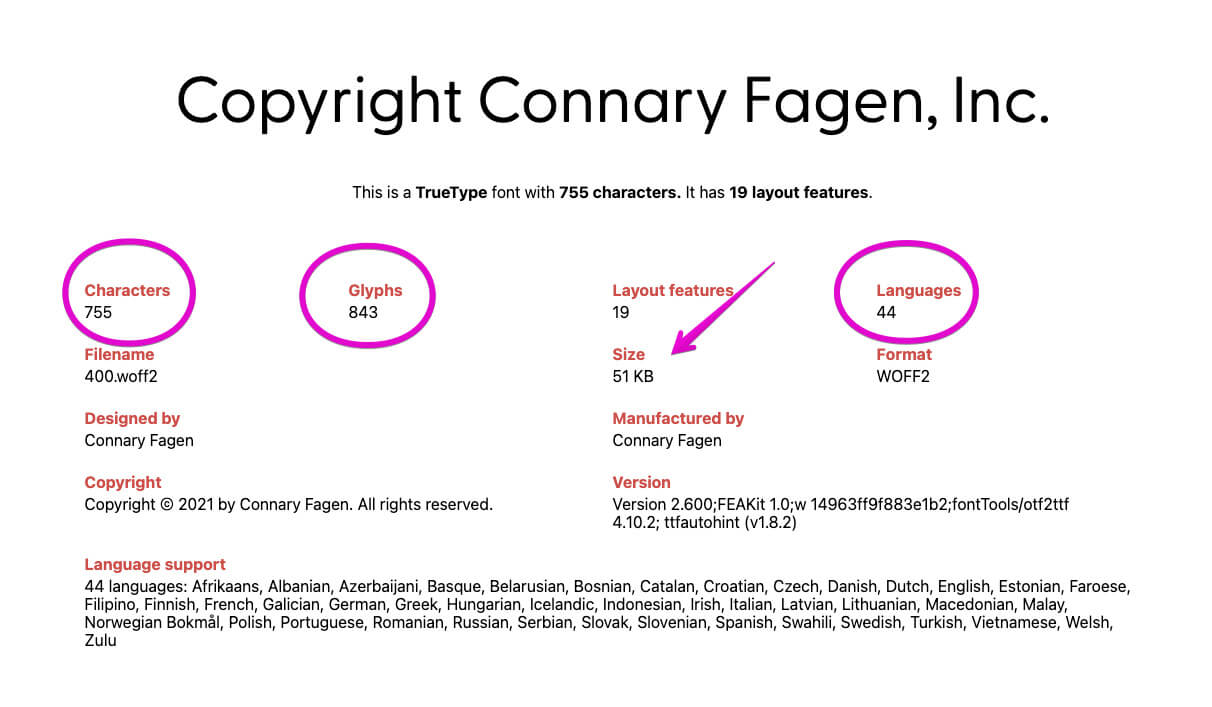 A font file of 51 kB before optimization. Source: Wakamai Fondue.
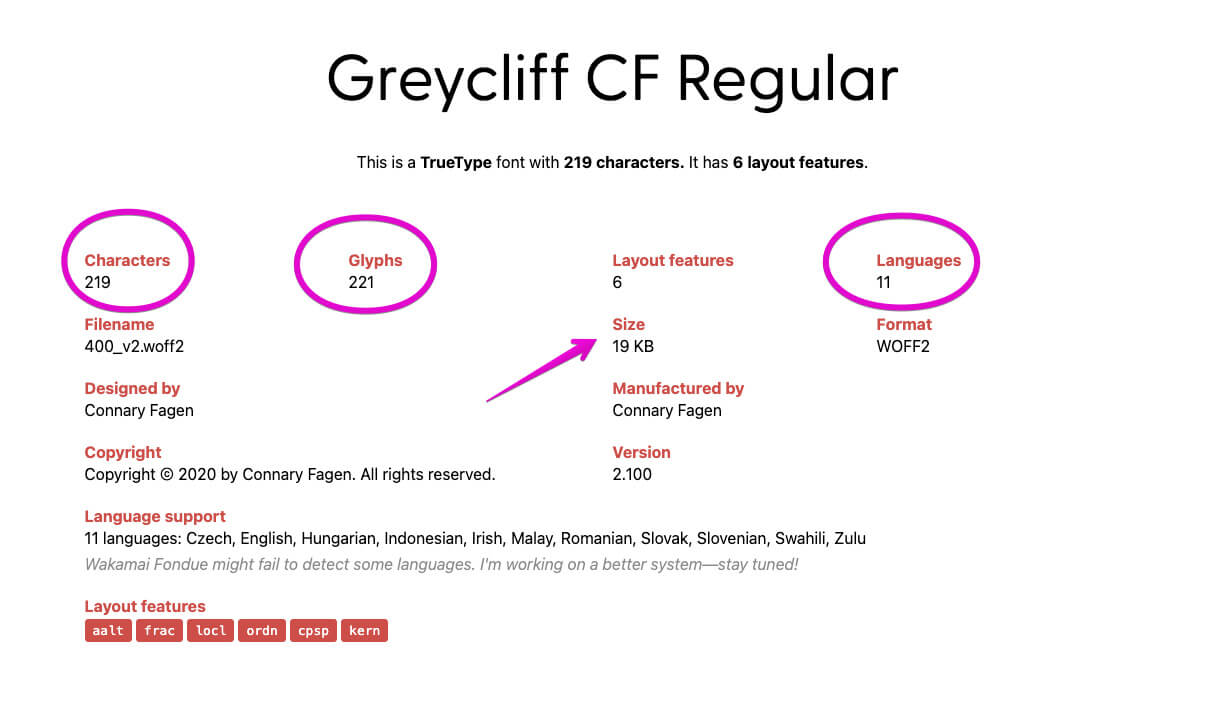 After optimization, the font file is 19 kB. Source: Wakamai Fondue.
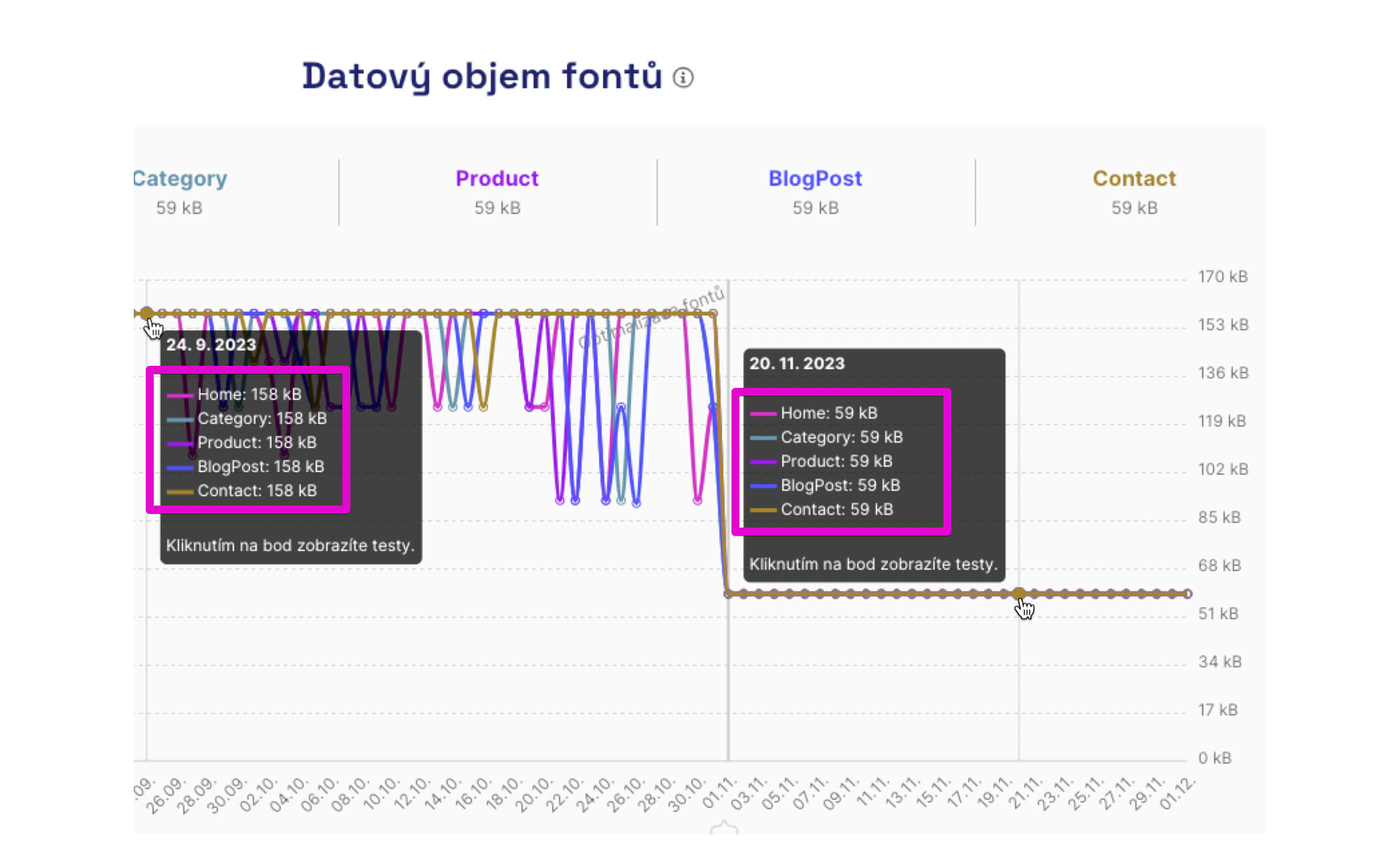 After optimizing all font files, we saved about 100 kB in data transfer. Source: PageSpeed Tester.
JS files and inline scripts
Place JavaScript files in the footer before the closing <body> tag or in the head before <head> with the defer attribute. Defer allows scripts to run after HTML parsing completes.
<script src="app.js" defer></script>
Avoid ad-hoc scripts inline in the page. For example, including maps.google.com/maps/api/js in the middle of the document can block rendering.
Proper Brotli or Gzip compression
When optimizing the web, verify compression settings for text files (CSS, JS, SVG, and ICO). Ensure compression is enabled on the server with Gzip or Brotli.
- For Gzip, aim for level 7 or higher, ideally 9–10. For Brotli, 6–7.
- Proper settings reduce file sizes and speed up loading.
- Don’t forget to check compression for SVGs as well.
- Do not compress WebP images; they’re already compressed and further compression can increase size.
You can check compression settings with the Gzip and Brotli Compression Level Estimator.
Other LCP optimization options
- Use BF cache for instant page loads from browser history.
- Add Speculation Rules for immediate loading via prerender or prefetch.
- Ensure LCP does not fall behind due to cookie banners or similar.
- Break CSS into smaller files.
- Keep the head tidy.
Final thought on LCP optimization
Optimizing the LCP metric is key to fast, user-friendly sites. Proper implementation of the techniques above can help.
Daily monitoring of LCP and speed and analyzing newly deployed code are essential to maintaining performance.
In our tester PLUS, you can use daily monitoring. For selected URLs we track CrUX data from Google and perform synthetic measurements with Lighthouse.
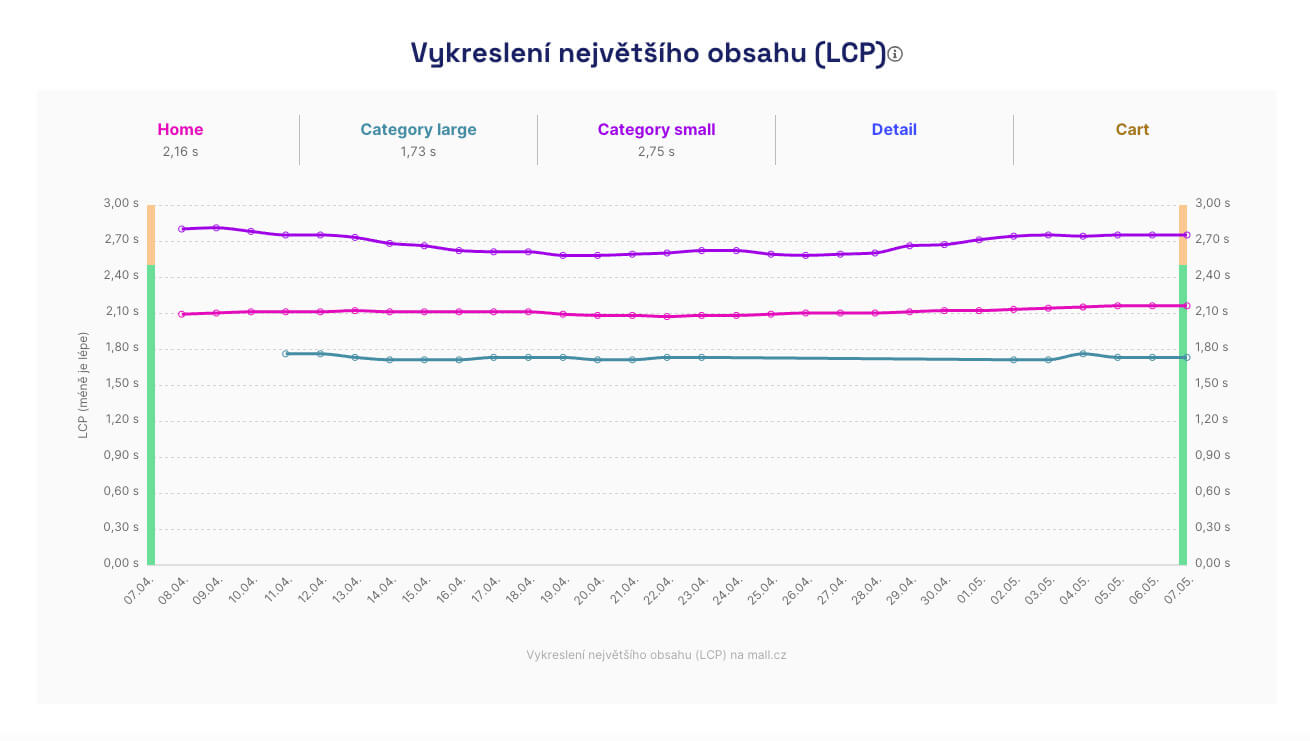 CrUX data for the URLs we monitor.
Using the Hlídač feature, we send performance deterioration alerts to Slack or Teams.
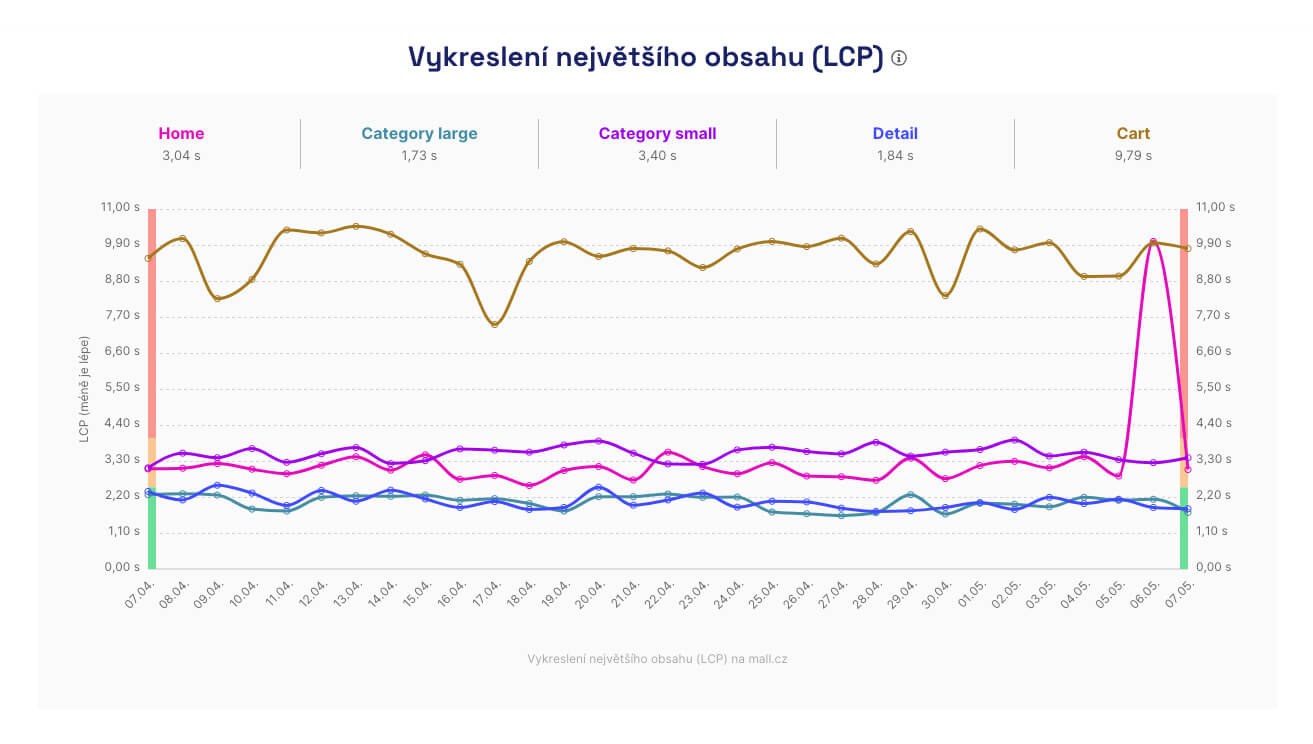 LCP deterioration in automated synthetic tests on app.pagespeed.cz.
We cover Core Web Vitals optimization topics in depth in our other texts: