setTimeout: Optimizing Long Tasks in JS
The setTimeout() approach helps optimize long JavaScript tasks that block user interactions and thus degrade metrics like Total Blocking Time (TBT) or Interaction to Next Paint (INP), a core part of the Core Web Vitals.
The problem? Long JavaScript tasks
In the browser, JavaScript runs on a single thread. Practically, this means all actions, events, and interactions queue up in the event loop.
The risk is when a task runs for a long time, blocking other work. That blocks the main thread and hurts perceived responsiveness.
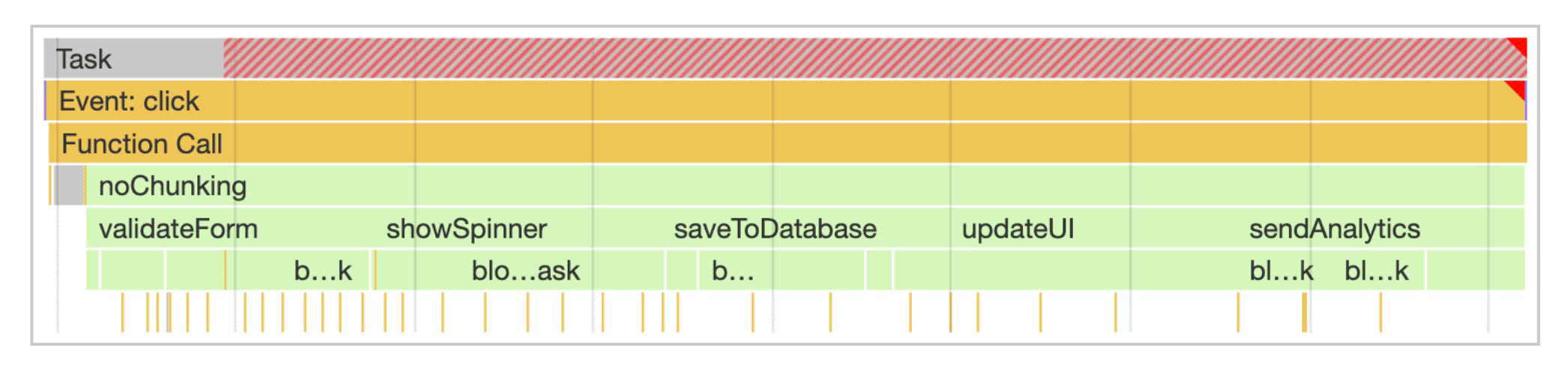 Long tasks take longer than 50 ms and are highlighted in red in DevTools’ Web Vitals view.
setTimeout() and INP optimization
To optimize the high INP metric, you need to split work by importance, defer less critical parts, and give the browser space to process other user interactions.
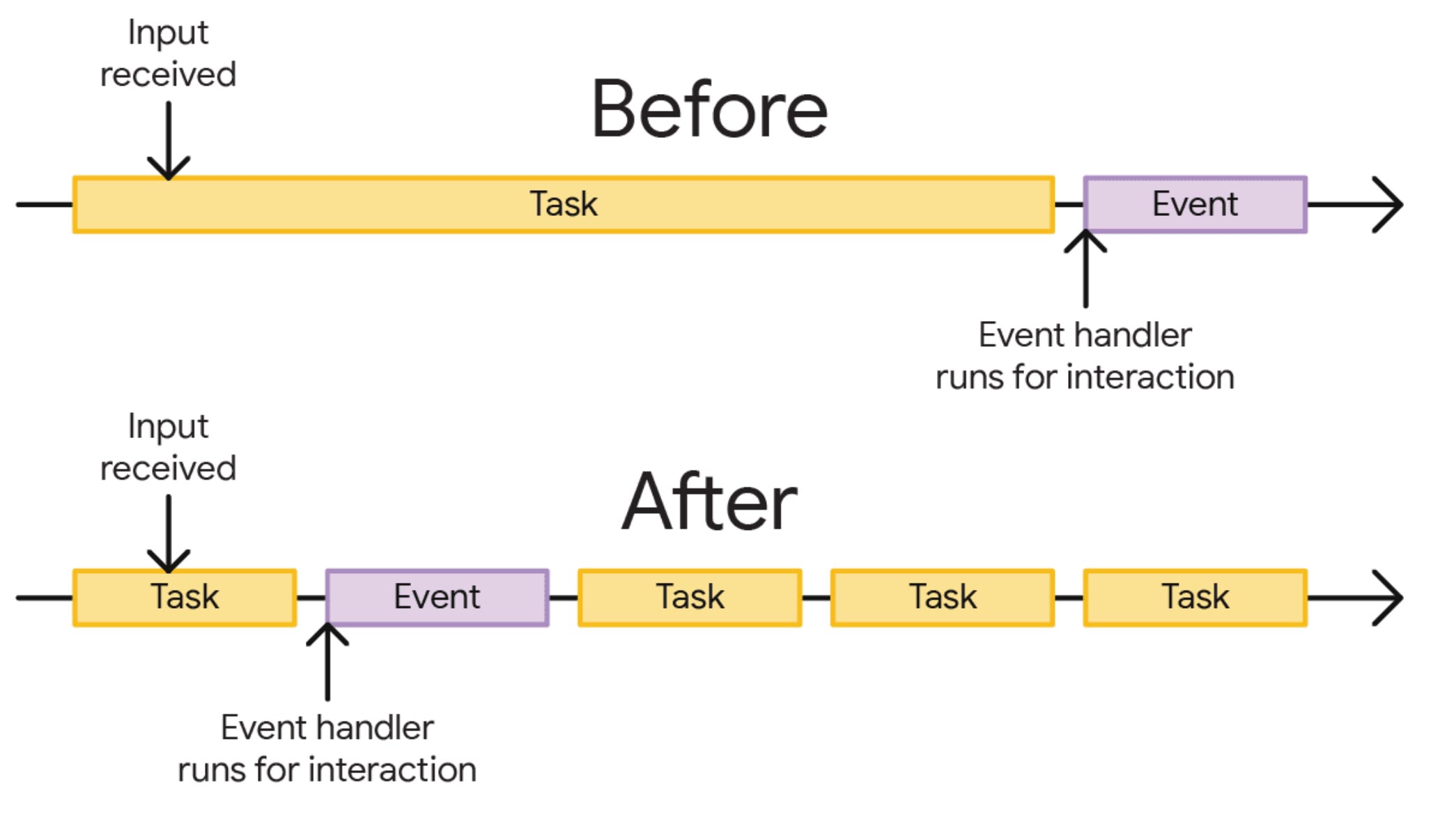 Before optimization, after input, users wait for the long task to start; after optimization, the long task is split into smaller pieces so the action can start sooner.
In JavaScript, long tasks can be tackled via asynchronous operations. The timer APIs, led by window.setTimeout(), let you defer selected work. A notable property of setTimeout() is that if you set a zero delay, the browser is likely to execute the task in the next rendering cycle:
setTimeout(() => {
	codeDeferredToNextRender();
}, 0);
In the current render cycle we update the UI. Writing to the database and analytics is deferred to a separate task, splitting the work into two.
function saveSettings() {
	// Do critical work that is user-visible:
	validateForm();
	showSpinner();
	updateUI();

	// Defer work that isn't user-visible to a separate task:
	setTimeout(() => {
		saveToDatabase();
		sendAnalytics();
	}, 0);
}
A faithful servant, a bad master
Nothing is free. This optimization can be simple, but simplicity hides pitfalls. There are situations where deferring work with setTimeout() causes issues.
Watch out for analytics
Deferring click-tracking or analytics can break reporting. If a click triggers navigation to a new page (i.e., not SPA routing), the JavaScript may pause and the code deferred with setTimeout(fn, 0) might not run. Defer only measurements that don’t cause navigation.
How much to defer
Deferring too many tasks can push work into the future, re-creating long tasks later. Browsers also have other work to do beyond your timers. Defer deliberately and sparingly. You can also tweak the timeout value to influence task priority.
JavaScript frameworks
Modern JS frameworks have their own task scheduling. Unthinkingly using setTimeout(fn, 0) can conflict with framework internals. Always check your framework’s recommended approach for deferring work by one render cycle. For React optimization, note that useEffect is not always asynchronous.
It’s a hack
Using setTimeout() for long-task optimization is, in many ways, a hack. It’s a simple API that delays work, but it isn’t a fundamental browser performance solution. There are newer APIs like scheduler.postTask() and scheduler.yield() in development, though broad browser support isn’t yet universal. With graceful degradation you can experiment with these APIs.
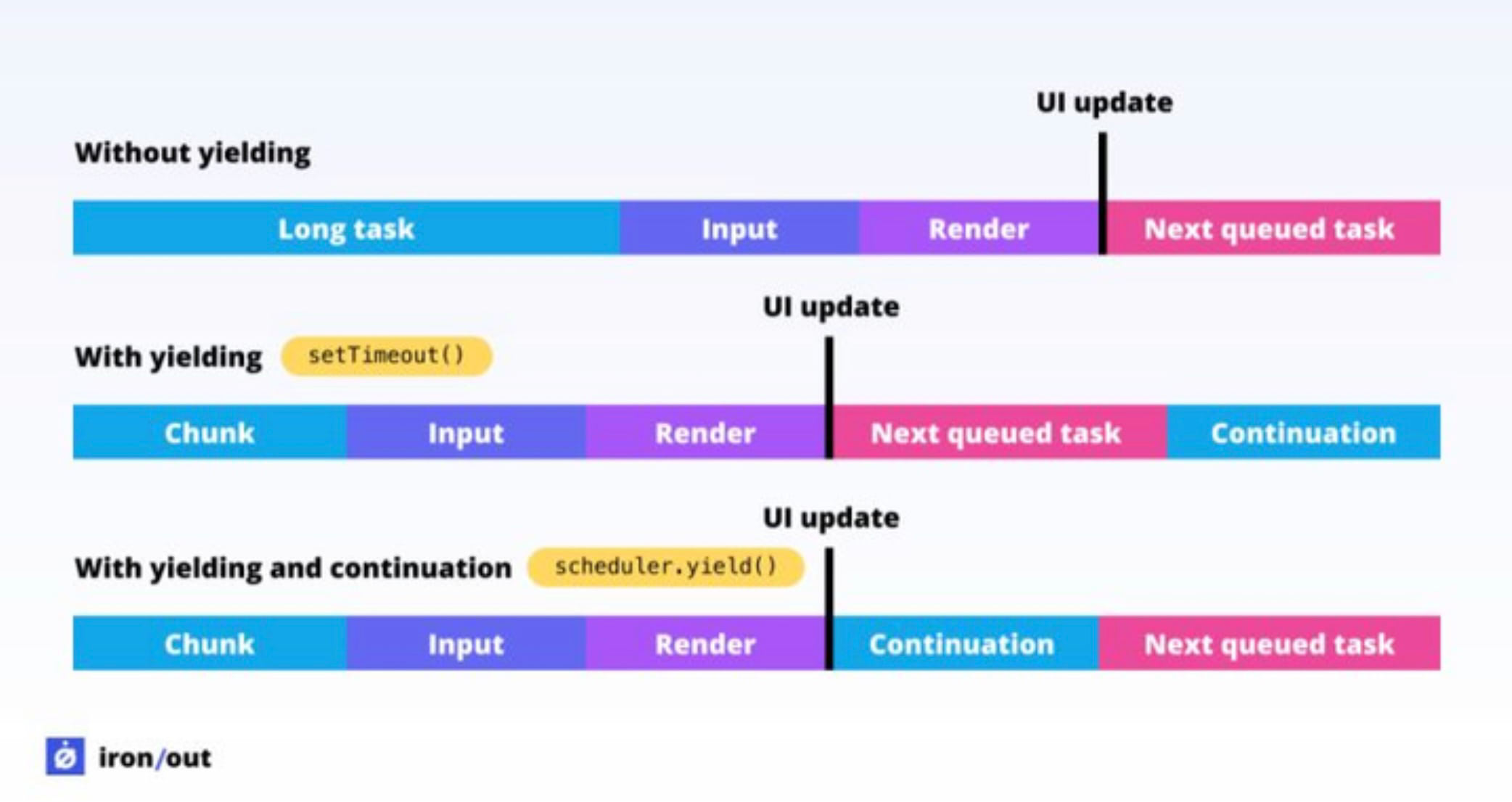 The difference between setTimeout and scheduler.yield(): a yield-based approach can prioritize the scheduled work higher than subsequent tasks.
Other ways to defer work
There are several other techniques to defer execution. They’re often cited as alternatives to setTimeout, but each has its own context and caveats.
- window.requestAnimationFrame() is frequently mentioned. It’s intended to synchronize style recalculations with DOM updates, making it ideal for JS-driven animations. If used to split tasks, you may worsen interactivity.
- window.requestIdleCallback() aims to defer work until the browser is idle, but you have little control over timing, which can be problematic for analytics-heavy tasks.
- MessageChannel() can also defer work to the next event loop. React’s scheduler uses a similar mechanism. It’s another tool, not a universal panacea.
Conclusion
While setTimeout is a practical “hack” for optimizing INP, its biggest advantage is simplicity and speed of adoption. It’s still one of the most reliable ways to stage work without blocking interactivity. Explore other INP optimization methods as well.
For broader guidance, see our other INP optimization materials.