Backend Speed Optimization: How to Help
The backend plays a pivotal role in optimizing site speed, because proper optimization on the code and server side can eliminate delays that often occur during request processing and content delivery.
This article is aimed primarily at backend developers or server administrators.
The backend’s impact on speed metrics
First, speed metrics aren’t only a frontend thing. The backend influences many metrics, including Core Web Vitals.
We measure backend speed with the Time To First Byte (TTFB). An ideal TTFB is under 0.8 seconds. TTFB directly affects site load speed and, specifically, the Largest Contentful Paint (LCP) time—the speed at which the largest element on the page renders.
A simplified graphic illustrates this: if TTFB is 2.6 seconds, you have a problem meeting the LCP threshold of 2.5 seconds. In that case, even the best frontend optimizations won’t save you—you’ll need backend optimizations.
“Time to LCP” is the sum of backend time and frontend rendering time.
https://content/know-how/backend-optimisation-01.jpg (Caption: The backend time plus frontend time together determine LCP.)

TIP: Speed optimization is a key driver of web success. A fast site not only improves user experience but can also boost SEO rankings.
Beyond LCP, the backend also impacts another Web Vitals metric: First Contentful Paint (FCP), i.e., how quickly any content renders.
Backend optimization is foundational, whether you’re optimizing WordPress, Shoptet, or another CMS system.
General tips to speed up the backend
There are countless places to optimize TTBF. In addition to the list above, here are some evergreen points:
- Increase server performance (CPU, memory) Sufficient server resources help process requests faster.
- Optimize the database Tune database settings, craft efficient queries, and leverage indexes.
- Use caching Implement caching at the database, memory (e.g., Redis), or HTTP cache level for frequently requested queries or endpoints to avoid repeated data fetches.
- Beware of multiple redirects Long round-trips extend overall page load time.
- Optimize DNS and network latency Use a tuned DNS setup and cache it to speed up loads. Consider relocating servers closer to your target audience.
How can a backend developer help with site speed?
The following tips aren’t purely about TTBF optimization, but they help overall speed.
Data compression, Brotli, GZIP
Brotli and GZIP are loseless compression methods that reduce data size when transferring text files like CSS or JS from server to browser. Both support multiple compression levels. GZIP has 9 levels; Brotli has 11.
Generally, we recommend a compression level of 6. Higher levels yield diminishing returns and increase server workload.
For fonts (WOFF and WOFF2) compression isn’t needed beyond the format’s own compression. If you’re unsure, test the compression level first. Services like Cloudflare can handle compression automatically.
Ignoring UTM parameters
UTM parameters don’t change content; they’re used for analytics. Ignoring them in caching can reduce duplicate cache entries and improve TTBF consistency.
Upgrading the backend stack
Maintaining and upgrading technologies on the development environment is vital. Newer versions can bring performance gains, helping speed and reducing technical debt.
Examples: compare PHP versions with benchmarks, or note how Laravel improvements can boost requests per second.
New image formats (WebP, AVIF)
New image formats offer better compression. WebP and AVIF are supported broadly in modern browsers.
- WebP can be used in PHP natively; quality parameters control output size.
- AVIF is available in PHP 8.1+; you can adjust quality and speed. AVIF rendering can be slower to generate, so consider using Cloudflare for on-the-fly conversion if needed.
See also our guidance on [web image optimization].
HTTP/3
HTTP/3 speeds up server-client communication by reducing handshakes and enabling better prioritization across CDNs and subdomains. It’s worth considering as part of a broader optimization strategy.
Early Hints
103 Early Hints can speed up resource loading by pushing preloads and preconnects earlier. Use selectively for critical non-render-blocking resources (e.g., CSS preload for critical styles).
Speculation Rules API
Chrome introduced speculative loading APIs to prefetch/prerender ahead of user actions. This can be targeted via CSS selectors, enabling prerendering for certain links.
Monitoring metrics
You can track backend timing with specialized monitoring tools. In our practice, CrUX data from Chrome UX Report (CrUX) is essential for TTFB.
Track in PageSpeed.cz PLUS monitoring, with a clear view on domain-level metrics and a history of changes. The tester shows metric trends over time.
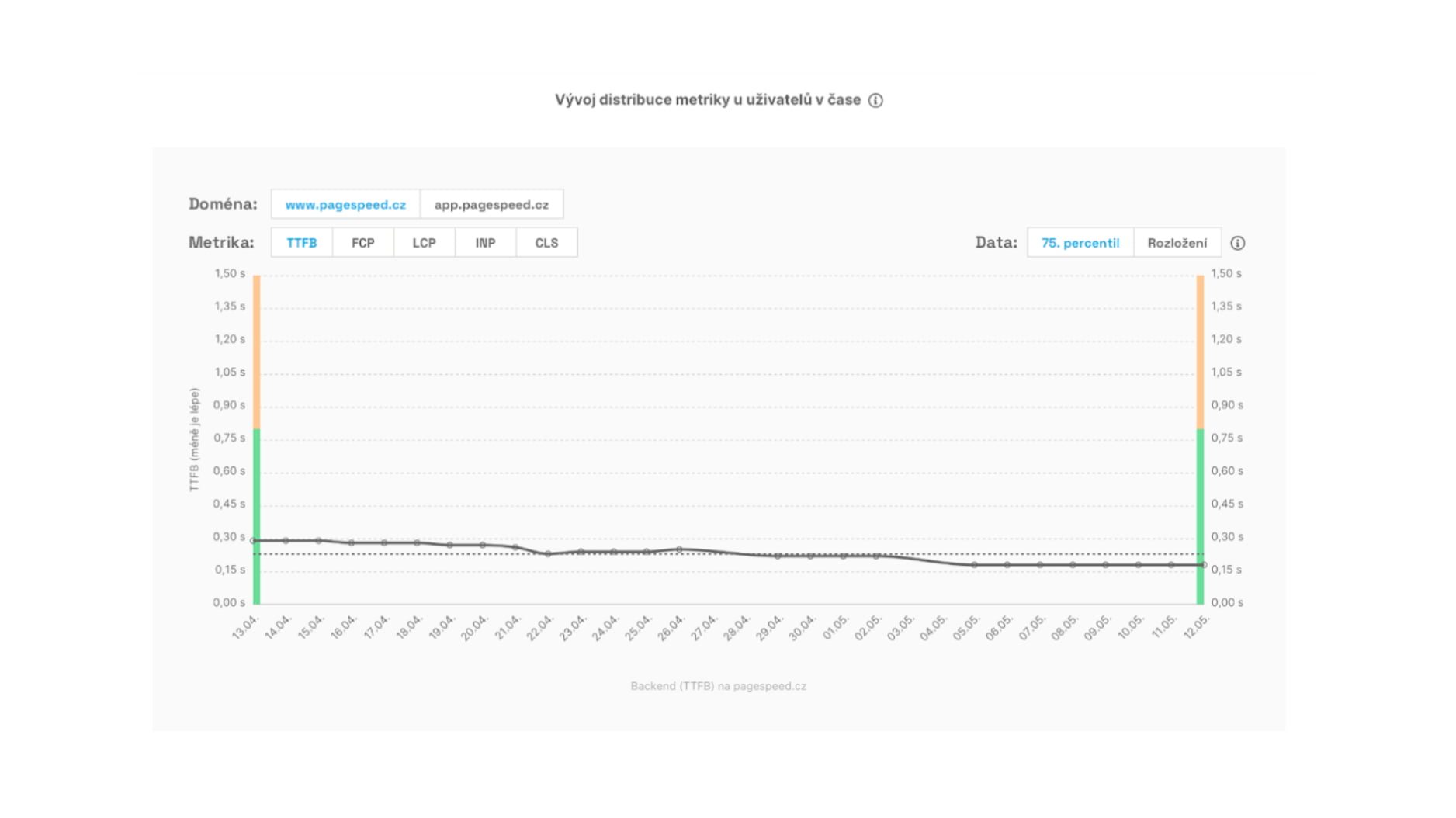 See the historical TTFB trends in the dashboard.
We’ve covered optimization topics for a long time and encourage reading:
In conclusion
If you don’t measure, you won’t improve. If you care about site speed, consider enabling our Core Web Vitals monitoring.
The ROI is strong: a tool that helps you pinpoint issues costs a fraction of debugging without data.

Speed optimization isn’t a sprint; it’s a marathon. Ongoing UX improvements and SEO/PPC gains require a data-backed partner.
Case study: Světla World redesign
Learn how monitoring data helped the Světla World redesign. For stable speed, we measure synthetically and with CrUX; for major changes we run full-blown RUM measurements to capture real-time data right before launch.