Technical Report
The Technical Report does not track user metrics; it tracks technical indicators, such as data volume or the number of requests.
We collect every URL you enter via Test Settings, and each day we compute the median of the tests and display these values.
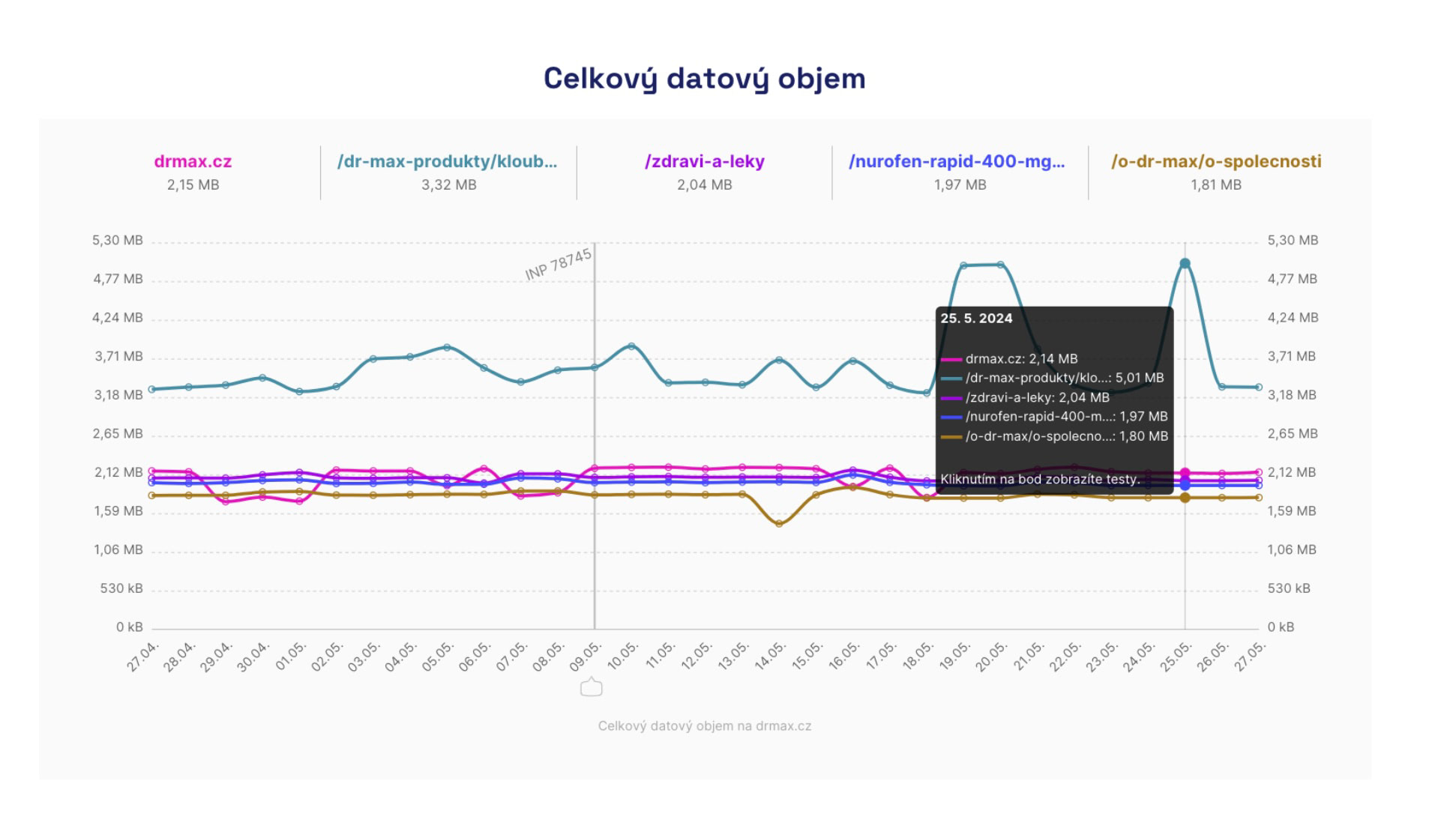 Fluctuations happen, but if it worsens and doesn’t recover, it’s worth reconsidering.
Technical indicators are not treated as the primary metrics, but they help you identify the causes of issues with user metrics (Core Web Vitals), which are reported by Watchdog or appear in Google data (Chrome UX Report) on the Domains or Pages reports.
🔐 The Technical Report is available only in PLUS Monitoring.
Why is it good to measure technical indicators for website speed?
The modern field of web speed optimization no longer treats these technical indicators as primary metrics.
From our experience in web speed consulting, we know that even sites that fetch large amounts of data can feel fast to users if the first render is well optimized.
Yet in our “Technical” report, which specifically tracks these secondary indicators, it’s useful to see them for reasons beyond user metrics:
- Useful for identifying correlations between changes in user metrics (e.g., [LCP], [CLS], [INP]) and changes during development (e.g., image data volume or the size of blocking JavaScript).
- We consider data volume a courtesy to users who may have limited data allowances on mobile.
- Often, less data transferred means lower infrastructure costs for the site operator.
In PLUS Monitoring you’ll see the Technical Report for all page types you configure in Test Settings.
The chart below shows both the current state of the metric and its evolution over time, for mobile and desktop.
Based on our advisory experience, we’ve added the following information and reports to the Technical Report:
HTML Data Volume
The chart shows the HTML data volume over time for individual pages. It represents the HTML as it arrives in the test browser, i.e., after compression with [gzip or Brotli]. The smaller the HTML data, the better.
We recommend keeping HTML size under 20 kB. It influences load metrics like FCP and LCP.
Number of DOM Nodes
The evolution of the number of DOM nodes for individual pages over time. A complex DOM tree makes JavaScript harder to work with and can affect metrics like TBT or INP.
We recommend a maximum of 1,500 DOM nodes per page. It’s an ambitious target, but it’s worth aiming for.
CSS Data Volume
The evolution of CSS data volume for individual pages over time. This reflects the state after possible gzip/Brotli compression on your server. CSS is a common render-blocking resource, so its size affects metrics like FCP and LCP. Ideally, keep CSS data under 50 kB.
Number of Blocking JS
The evolution of the number of JS files that block the first render. JavaScript can be blocking, unlike CSS.
Fewer blocking JS files is better for metrics like FCP and LCP.
JS Data Volume
The evolution of JS data volume for individual pages over time. This includes both blocking and non-blocking JS files. The chart shows the state after possible gzip or Brotli compression on your server.
Smaller JS means less code to process and execute by the browser. It affects interaction metrics like TBT or INP. Blocking JS also influences FCP and LCP (the first render).
Third-Party JS Data Volume
The evolution of data volume for third-party JS per page over time. This category includes JS executed on domains other than your main domain, so you may see your own files hosted outside your main domain here.
Typically this includes data from analytics, chat, A/B testing, advertising, etc.
This code also affects interaction metrics like TBT or INP. Keep it as small as possible.
Font Data Volume
The evolution of font data volume per page over time. Fonts are typically needed to render content and thus impact LCP.
We recommend keeping font data under 50 kB.
Image Data Volume
The evolution of image data volume per page over time. Images are often essential for rendering content and can impact LCP.
We recommend keeping image data under 100 kB per page.
Total Data Volume
The evolution of the total data volume of all downloaded resources per page over time. Total data volume might not directly affect metrics or user experience, but we recommend keeping it under 0.5 MB per page.
Tracking technical indicators can be very helpful when you decide to focus on any of the metrics above and on specific page types.
What to do if you see a deterioration in any technical indicator?
First, note that it isn’t always a significant issue. Make sure you also see an impact on user metrics in the same time window (see Watchdog, Pages, or Domains reports).
Sometimes the deterioration cannot be influenced, e.g., for third-party components. Still, it’s worth paying attention to third parties.
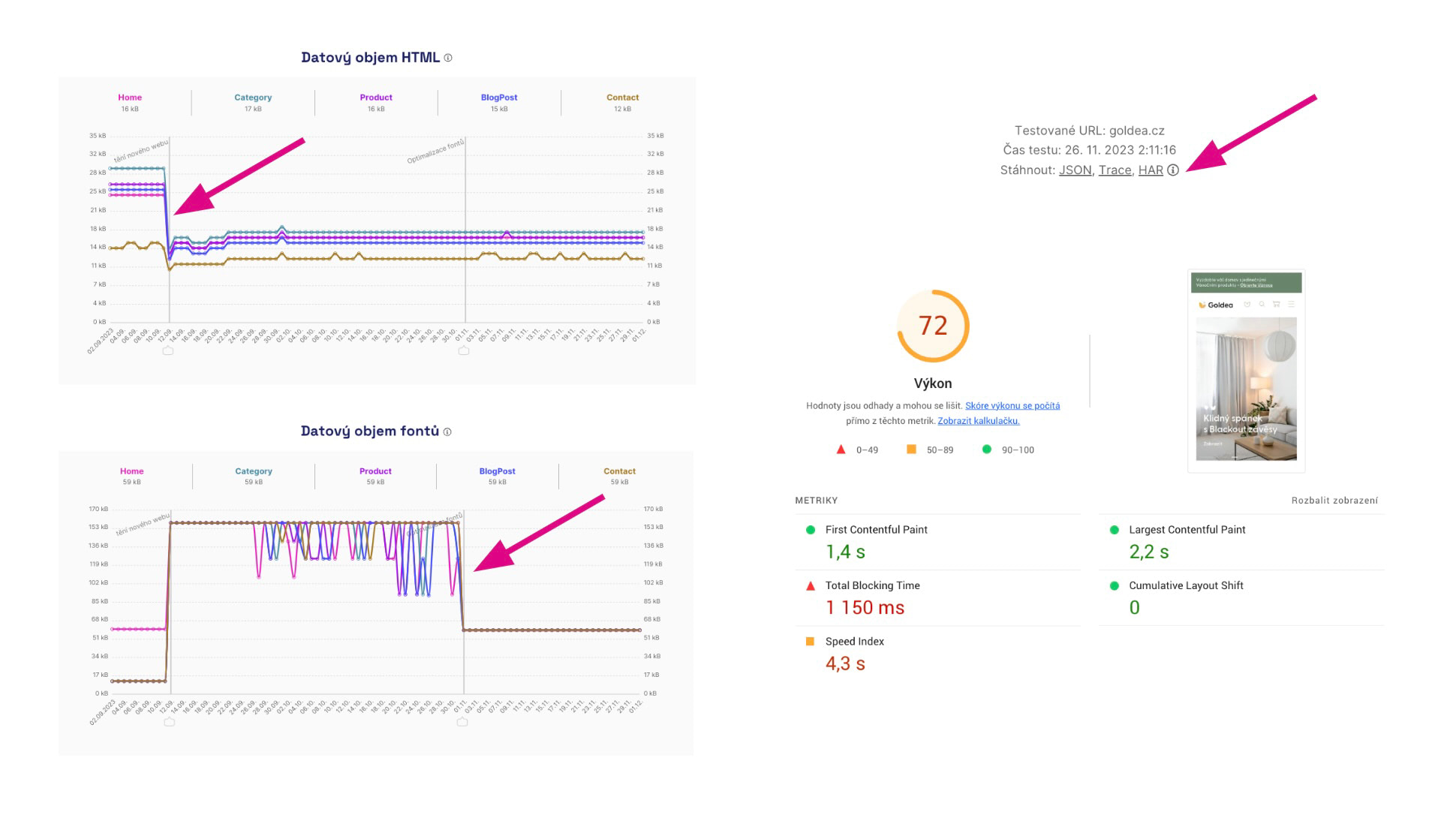 Improvements in technical indicators are always good news.
In the test run details Lighthouse you can see an even broader context.
Do you still see a Technical Report problem on your side that also worsens Core Web Vitals (e.g., deterioration in Watchdog or Domains reports)?
- Find the specific change in the graphs. Which page type does it relate to? Is it the same for mobile and desktop?
- By clicking a value in the graph you’ll open Lighthouse, which shows the exact measurement with additional context.
- Ask developers, marketers, and other team members what changed during that period.
The Up and Down guide is a complete tutorial on speed tuning using PageSpeed.cz monitoring.
