Speed Monitoring: Why Every Web Development Agency Needs It
Website speed affects conversions, SEO success, and PPC costs. Agencies that monitor speed can promise clients regular optimization sessions or offer new service packages.
In this article we explain why speed monitoring is valuable for development agencies and what our Speed Monitoring PLUS offers.
Why speed up and monitor websites?
How does site speed help your business?
- Increase conversions.
- Improve Google SEO rankings.
- Lower Google Ads PPC costs.
On a large e-commerce site, we measured that users loading around one second have a 3.5x higher conversion rate than users loading around 2.5 seconds.
TIP: Read the reasons why to optimize speed and why speed monitoring is important.
If you don’t measure, you won’t speed up. Monitoring is the essential first step to beginning site-speed optimization:
- When something goes wrong, monitoring ensures you know about it.
- It gives you data to target optimizations and improvement ideas.
- You’ll get feedback after deploying changes.
Occasional PageSpeed Insights tests can make you think everything is running smoothly. You need long-term speed-metric monitoring that catches issues and informs you.
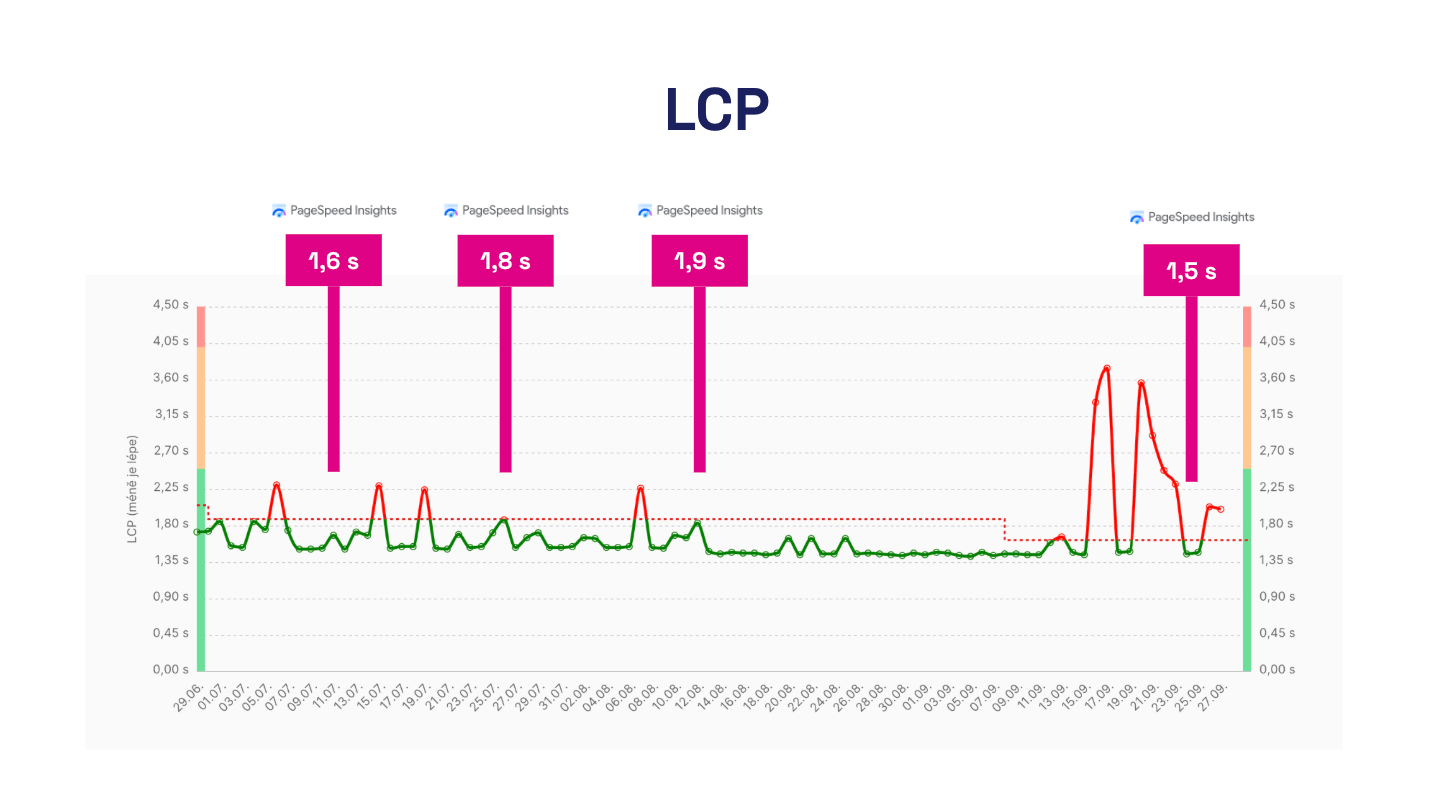 Measuring speed once in a while can give the impression that everything’s fine. It’s not usually the case.
How does speed help development agencies?
We’re partnering with companies like PragueBest, SUPERKODERS, PeckaDesign and Programia and see that speed monitoring helps them serve clients better:
- Speed as a business improvement for the client Faster sites and higher conversion rates mean happier clients and more development work.
- Better client retention Agencies monitor speed, giving them another reason to maintain the relationship.
- Long-term client collaboration Agencies monitor speed, continuously engage with the project, and optimize. It’s work many developers enjoy.
How do speed-monitoring results from PageSpeed.cz rate development agencies?
“We value the daily data review and email notifications in PageSpeed.cz PLUS. It has proven effective to tag changes and track their impact.” — Eduard Beneš, PragueBest
Why should monitoring be paid for by the agency itself?
When an agency pays for monitoring, it has full control. It sees all data, can react quickly to changes, and can use monitoring as a proactive optimization tool.
This gives the agency visibility into site speed and enables it to propose improvements to clients rather than waiting for requests.
Advantage for agencies when negotiating contracts
Monitoring can be easily included in web maintenance agreements:
- SLA and maintenance Monitoring as part of regular maintenance and reporting.
- Service packages Included with premium services alongside other optimizations.
- Speed guarantees If you guarantee site performance to a client, you need tools to monitor it.
With monitoring, the agency moves from a supplier role to a strategic partner helping clients keep their site performing at peak.
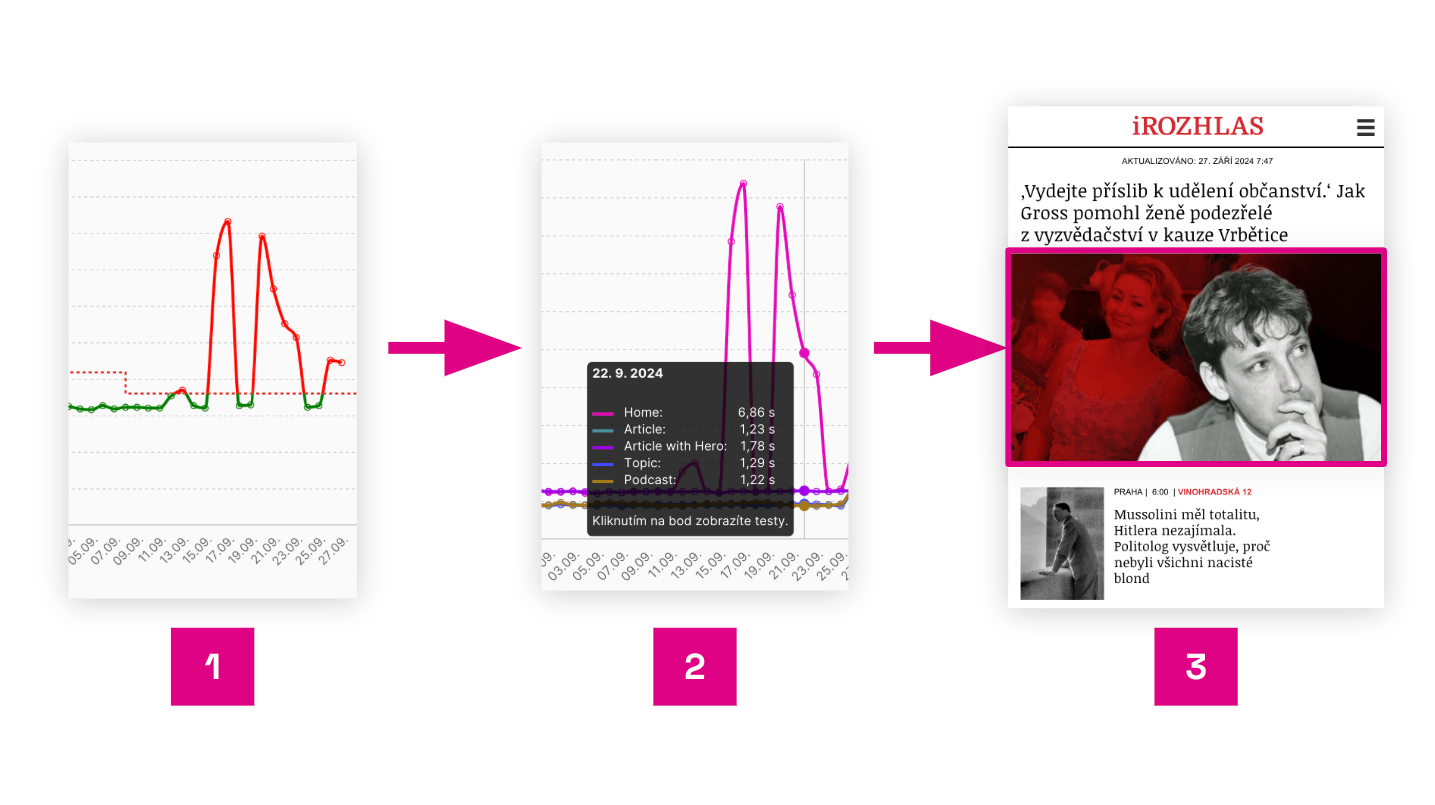 Diagnosing the cause of speed drop with PLUS monitoring on iRozhlas.cz.
TIP: In addition to speed monitoring with PageSpeed.cz, we also offer help with [web speed optimization] or [training your developers].
What is and isn’t speed monitoring?
There are many tools on the market, and agencies sometimes mix up different kinds of monitoring. We see them leaning toward tools that address other problems. The most common pitfalls:
- Sentry – great for tracking JavaScript errors and frontend apps, but not ideal for measuring web speed from a user’s perspective.
- Grafana – excellent for visualizing backend/server metrics (CPU, RAM, API latency) but does not address frontend and real-user page-load experience.
- CrUX Dashboard – provides aggregated real-user data from the Chrome UX Report, but lacks daily visibility and deep analysis of specific issues.
- Pingdom / UptimeRobot – focus on uptime and simple synthetic tests, but not primarily on site speed.
- Lighthouse in DevTools or PageSpeed Insights – one-off tests for local development, but no continuous monitoring or time-based comparisons.
Most tools address code issues, backend monitoring, or browser-based data. For site-speed monitoring, you need more:
- Long-term metric tracking How does performance evolve over time? When did a regression occur?
- In-depth analysis of specific pages and problems How does speed differ desktop vs. mobile? Which pages are the slowest?
- Immediate feedback When you deploy a new version, you’ll know whether it slowed down or sped up.
PageSpeed.cz speed monitoring fills these gaps.
What does Monitoring PLUS from PageSpeed.cz offer to development agencies?
Our monitoring tool grew out of real-world practice—built from client consultations and collaboration with development and marketing agencies. It delivers data that truly helps optimize site speed.
Now, let’s look at what our tool can do for you.
For each client, you’ll see a dashboard with the test sets and speed metrics:
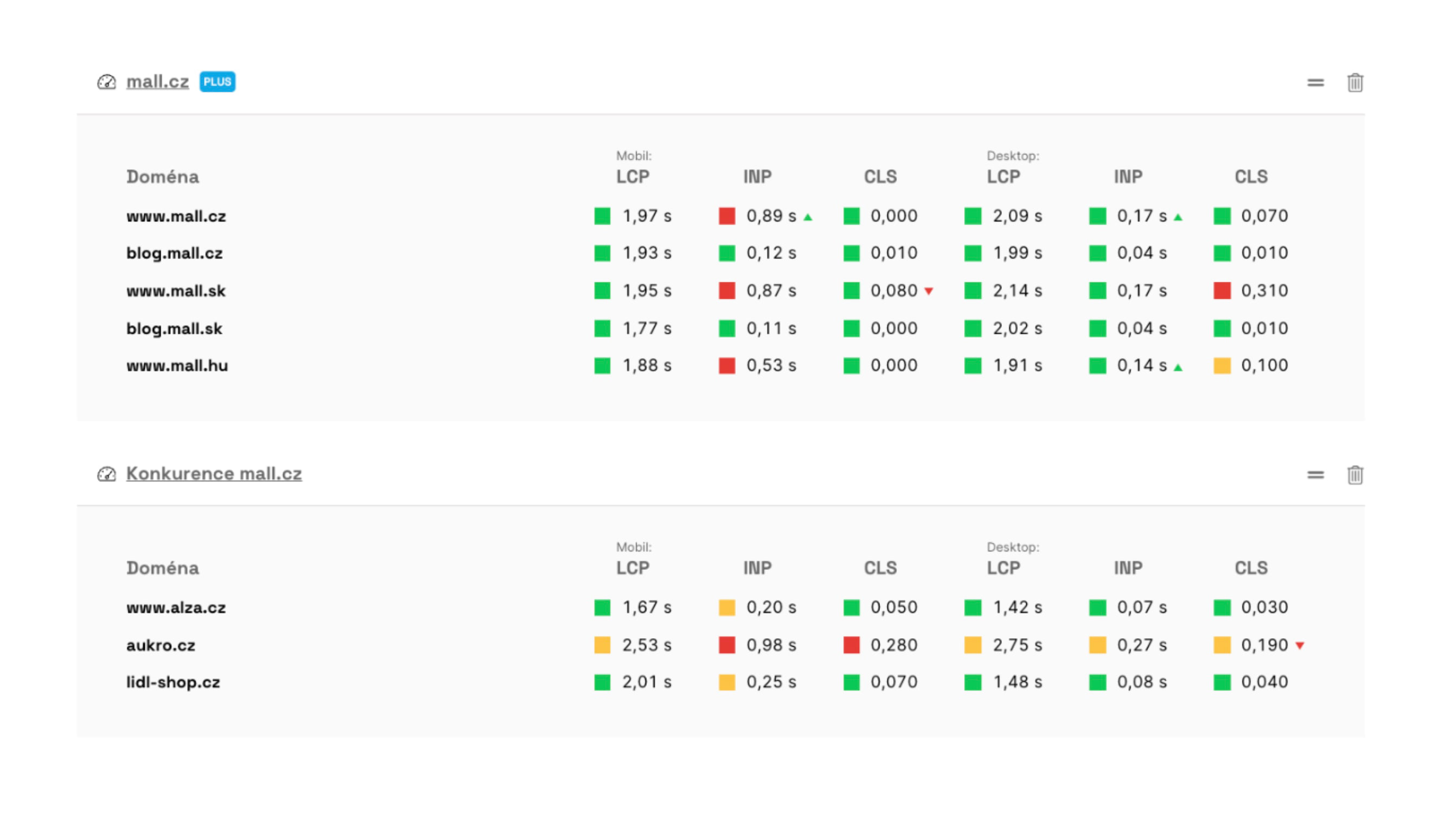 The client dashboard shows two test sets.
Team and client management comes with the solution, but isn’t the core of the app. The focus is on testing, its outputs, and regular reports.
Watchdog, notifications, and regular reports keep you in the loop
Each month you’ll receive a digest of the most important updates for every client:
Monthly reports include a quick performance update (1), client site status (2), and metric trends.
A powerful tool for your developers is the Watchdog, which monitors daily synthetic tests:
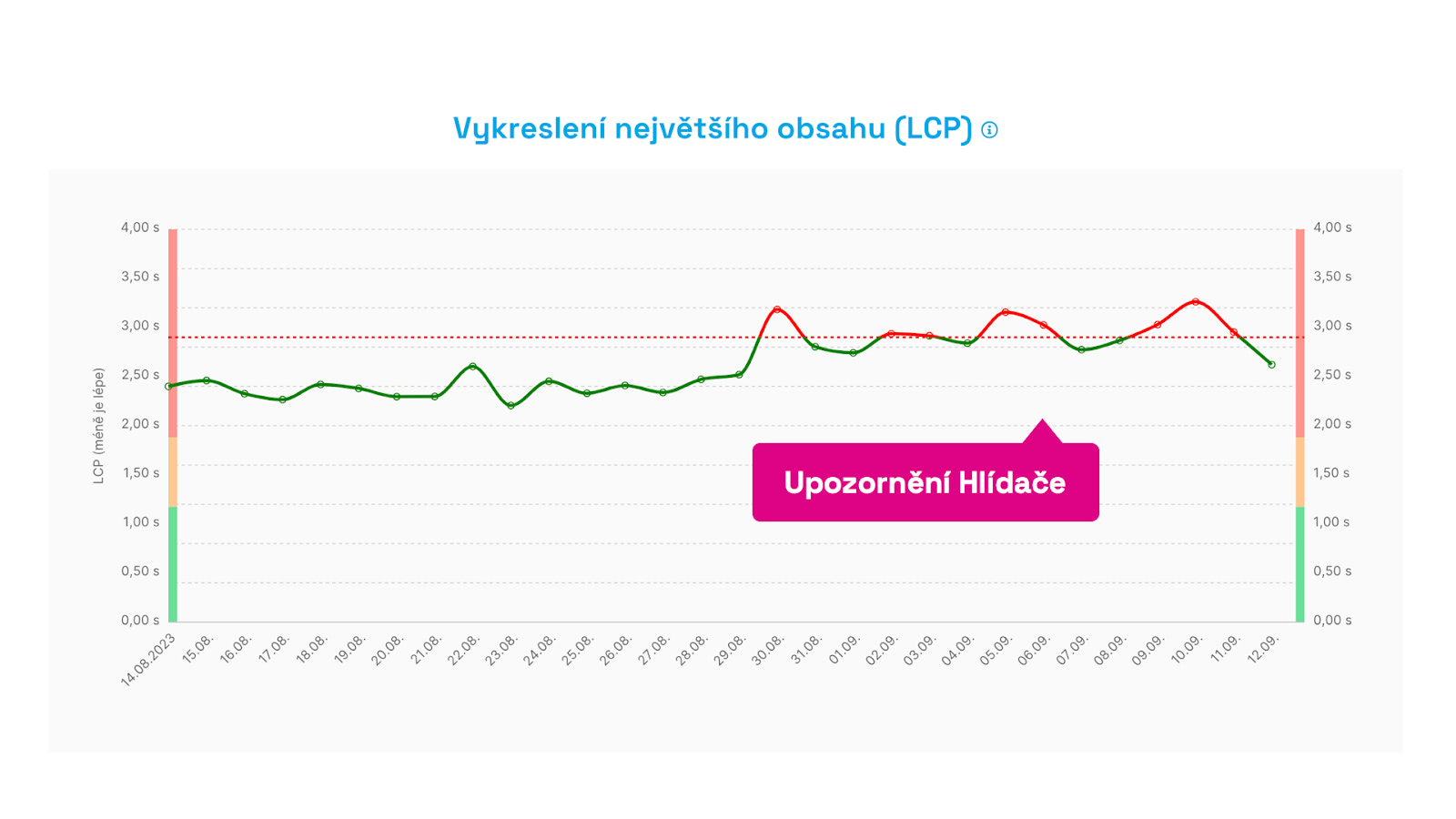 Watchdog sends alerts if a key metric moves positively or negatively for three days or more.
If something goes wrong (or improves), you, your PMs, or developers receive a report by email, Slack, or Teams:
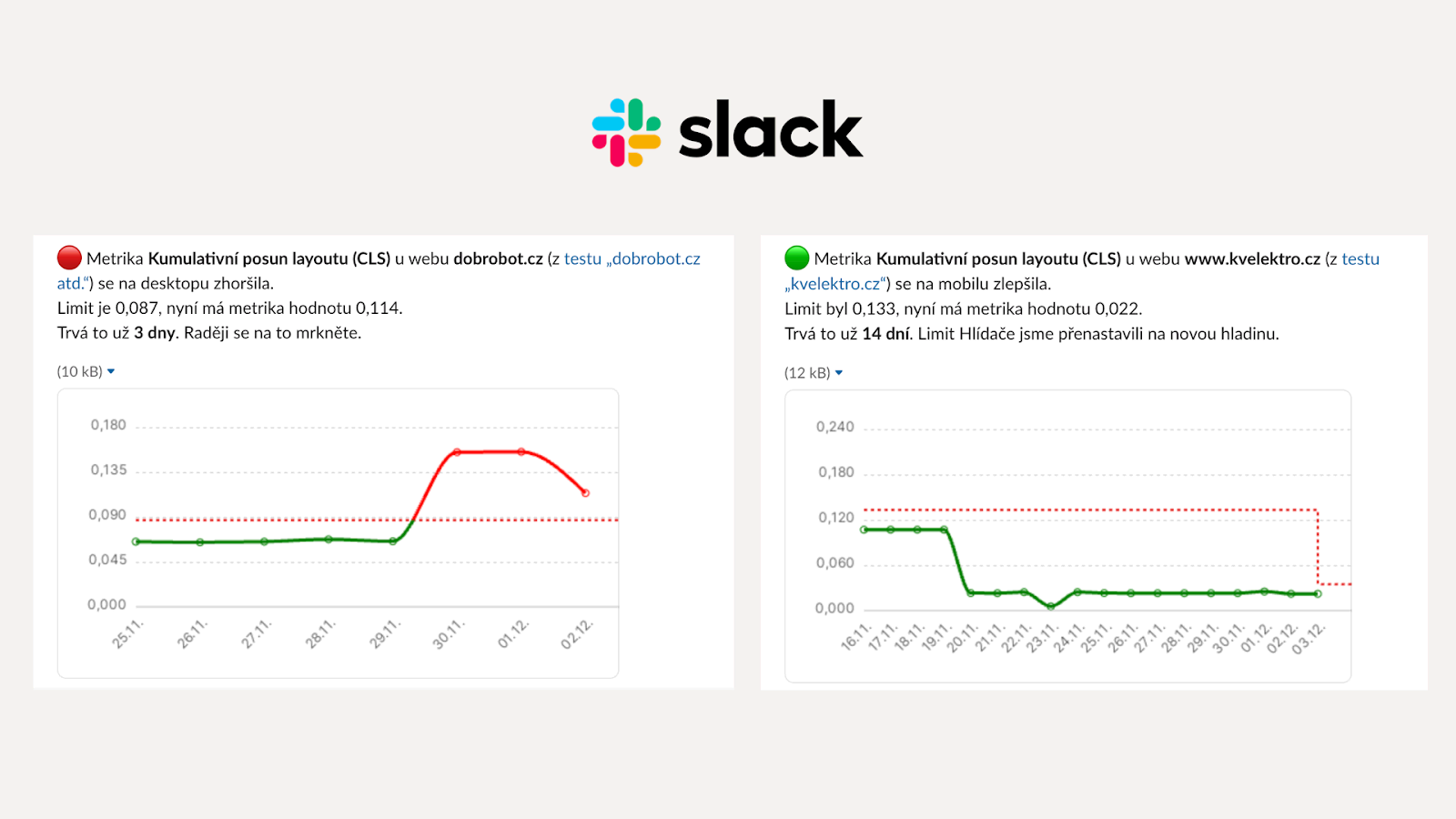 Watchdog notifications to Teams.
Tip: Our monitoring shows CrUX data from Google users and we also run our own synthetic tests. Find out why you need both types of measurements in Synth + CrUX reasoning.
Detailed technical data for deep debugging
Your developers will appreciate detailed technical reports that help pinpoint issues or optimization opportunities.
The [Pages] report](/docs/report-pages) shows the evolution of metrics for the measured page types, making it easy to identify which parts of the site are underperforming:
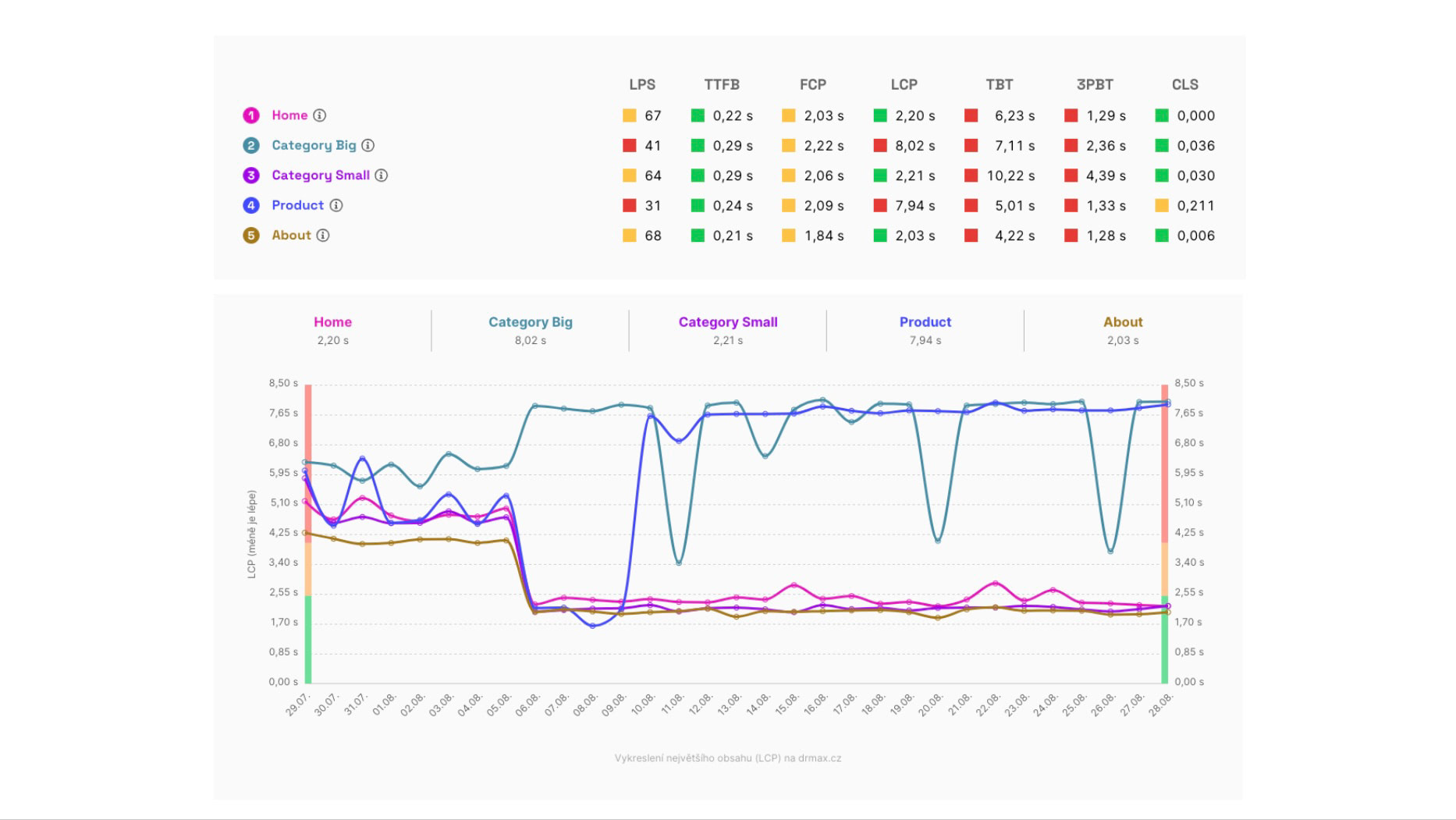 Detailed metric states and their evolution for key pages on the e-commerce site, as shown in the Pages report.
The Technical report then adds technical indicators for each page, such as the data volume of individual elements that can drive metric degradation:
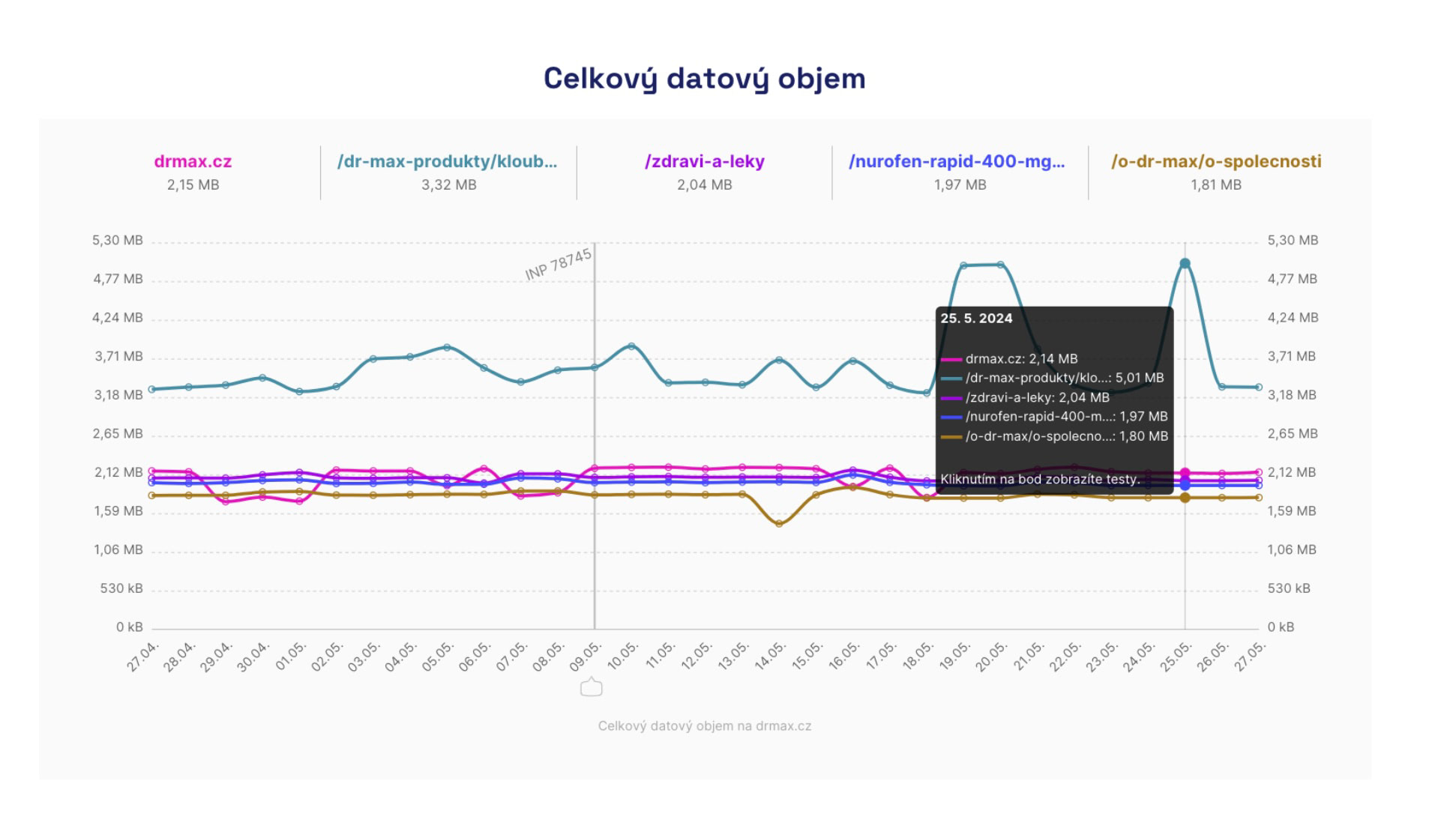 Technical metrics like total data volume often reveal what's driving metric declines and user experience issues.
The Test Run Detail provides even deeper insight with a full Lighthouse run report or profiling data that you can open in Chrome DevTools:
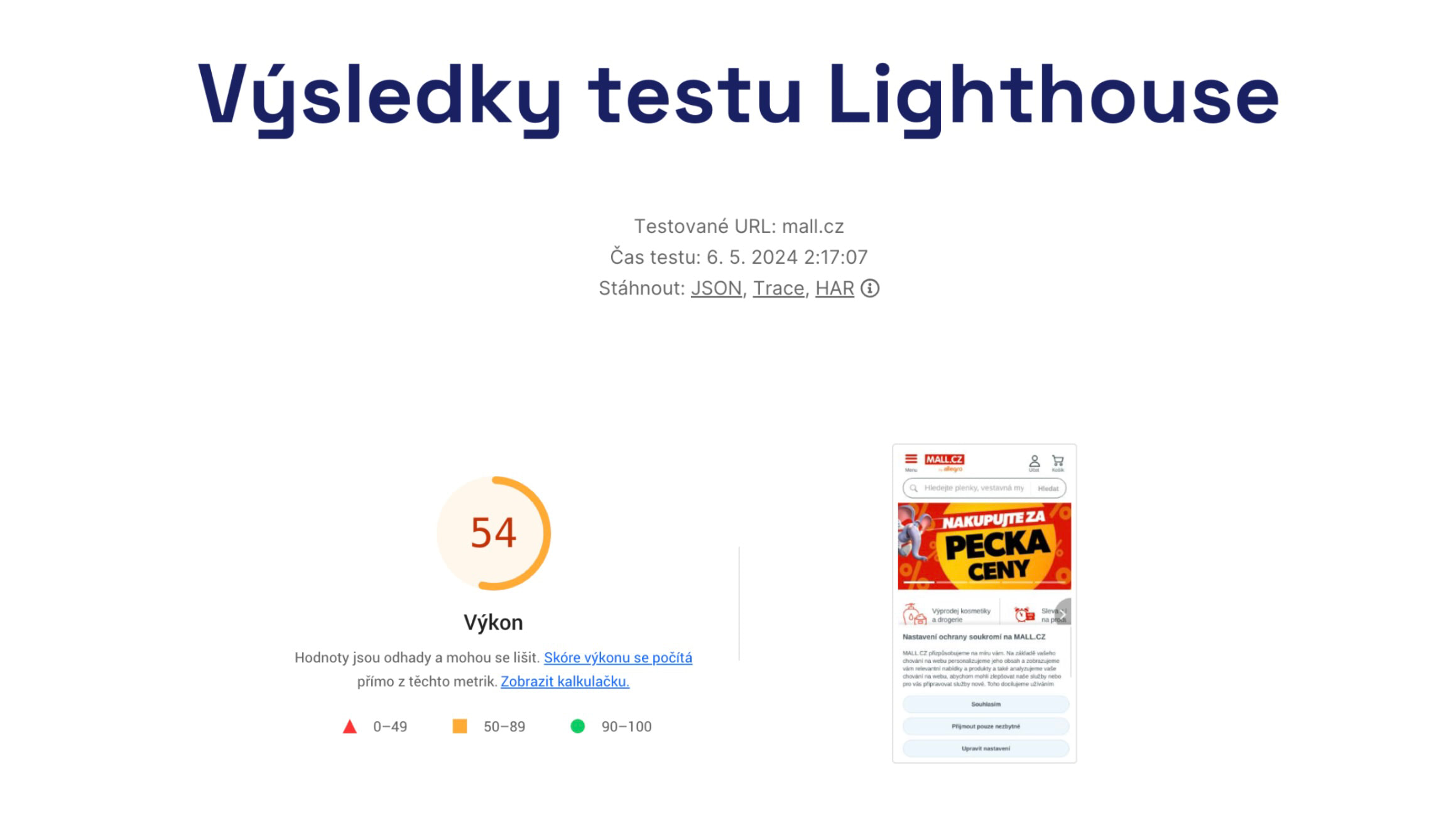 Performance enthusiasts can download Trace or HAR from the test run for use in Chrome DevTools.
The Opportunities report is the main place where we show tasks that can help speed up the site:
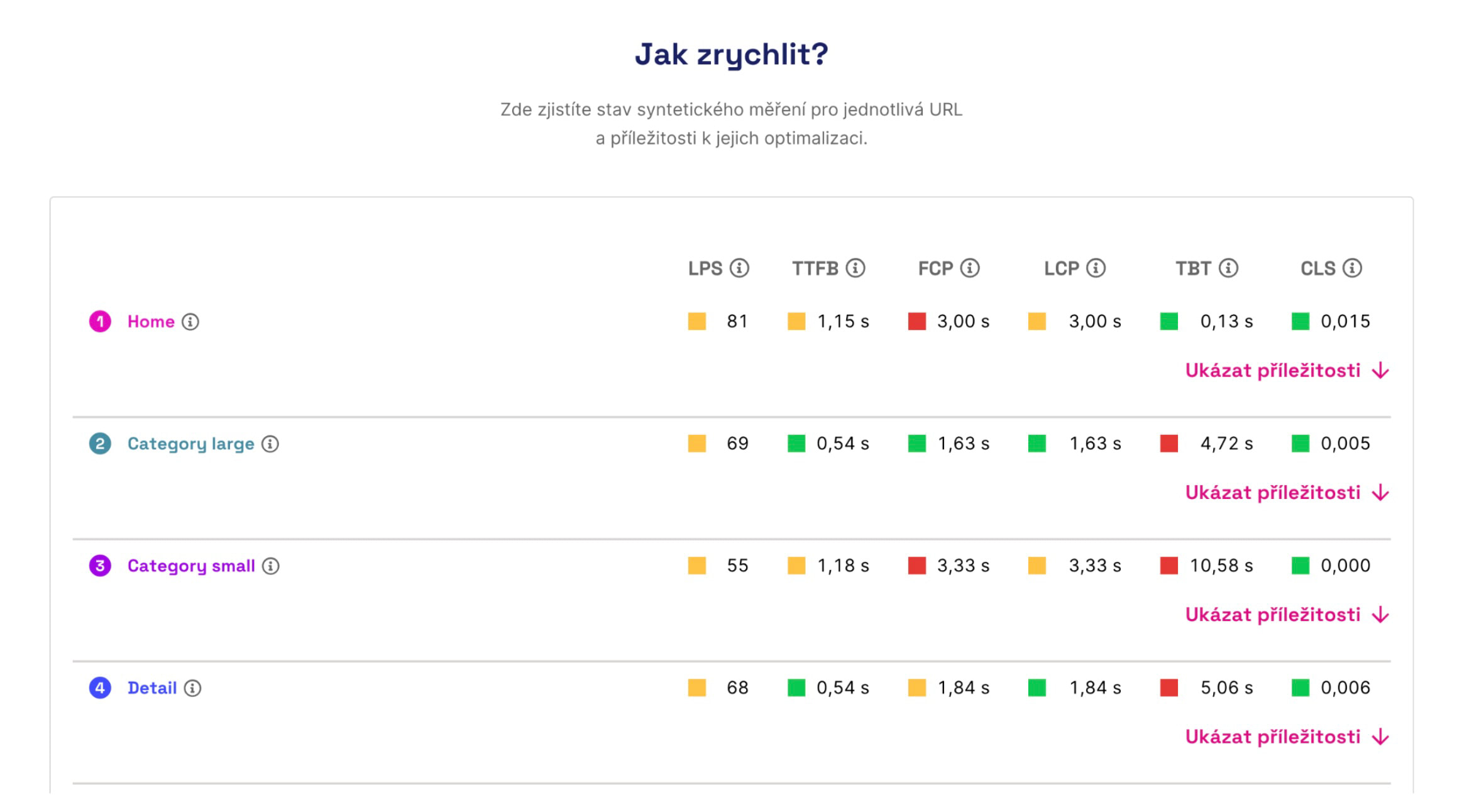 What’s the metric status for a specific page type and what can we improve?
In PLUS monitoring, developers will find plenty of extra goodies built on our experience. One is the ability to add notes to graphs to mark important deployment moments on the site:
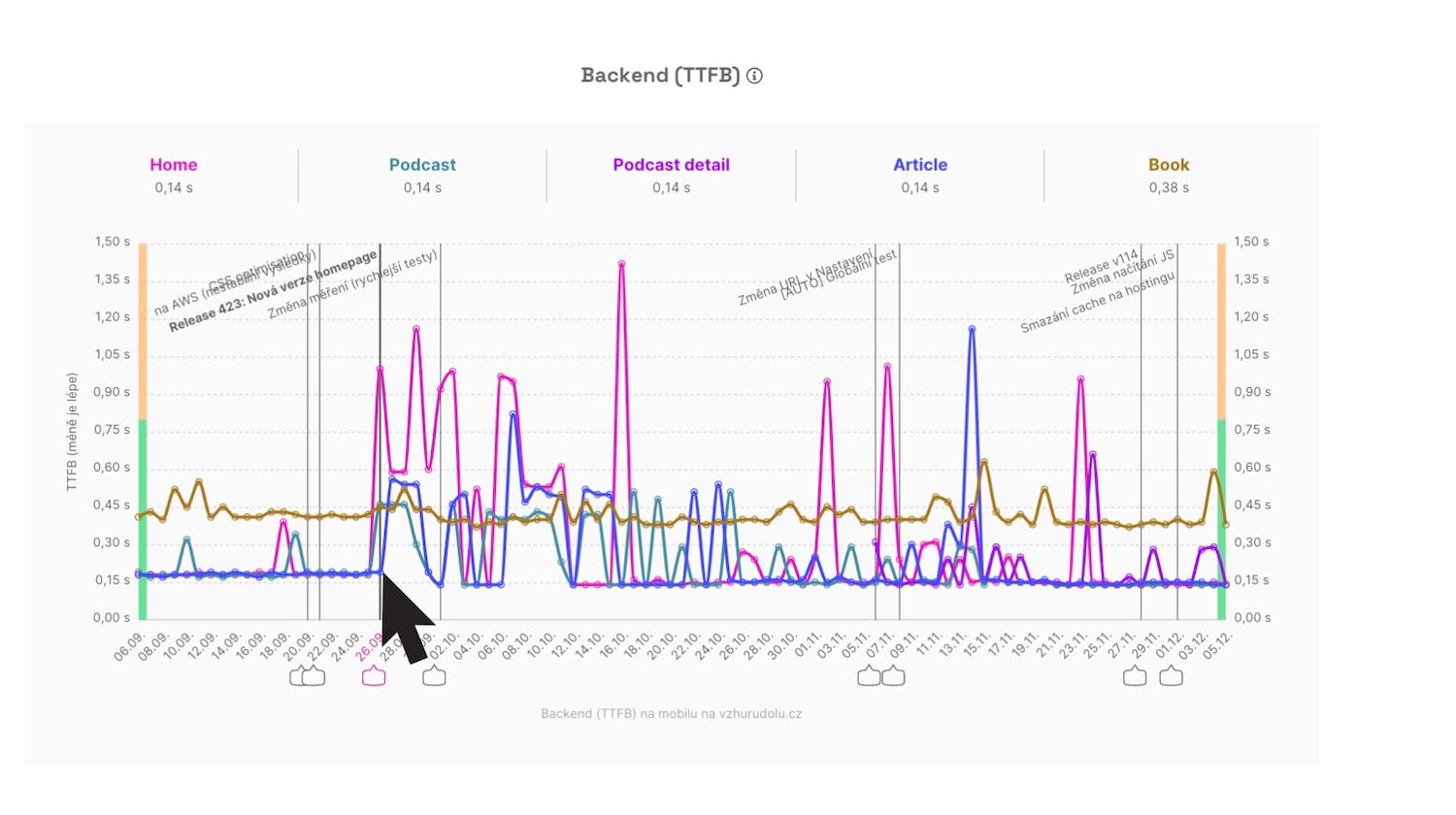 Notes are added automatically, for example when a test URL setting changes or we modify testing infrastructure.
Of course, PageSpeed.cz monitoring scales to any number of clients and users.
There’s a lot more. Check out the Monitoring Documentation as we continually add new articles.
How to get started with Monitoring PLUS?
Pricing for PageSpeed.cz speed monitoring is currently lower than similar tools:
- 5,400 Kč per year for one fully monitored site (the so-called “test set,” including 5 URL synth tests and 5 CrUX domains).
- 1,200 Kč per year add-on for 5 extra URLs or 10 additional domains on larger sites.
- Agency discounts or commissions starting at 10% for 5 or more test sets.
Examples:
- For a client with a small e‑shop, two language variants, and two competitors to monitor, you’d pay 5,400 Kč per year.
- For a larger client where you want to monitor two sites in detail, with 10 URLs per site and 20 total domains, you’d pay 15,600 Kč per year ((5,400 + 2 × 1,200) × 2).
More details are in the pricing.
Interested or want to talk more about speed monitoring?
- See the landing page or the sample project.
- Book a demo with Martin Michálek.
For serious interest, we offer agencies a two-month trial.
Try monitoring on your own project and see how easily it fits into your workflow.

…or simply order Monitoring PLUS.