Largest Contentful Paint (LCP) Metric: A Guide to Faster Web Loading
The world of Largest Contentful Paint (LCP) metrics is like adrenaline-fueled auto racing—a constant race against the clock. Let’s navigate the twists and turns of our track to be as prepared as possible. What will we learn?
- What is the LCP metric?
- What are its recommended values?
- Why is it important?
- How is LCP calculated?
- How and where should we measure it?
- What are common pitfalls and optimization options?
Getting to Know the LCP Metric
LCP measures the time until the page displays its largest element. This helps users assess the page’s usefulness.
This metric is part of Core Web Vitals, used to gauge page loading speed. Core Web Vitals metrics are also among the signals Google uses when ranking search results.
Keep LCP under 2.5 seconds
If you want LCP in the green acceptable range, aim for ≤ 2.5 seconds. LCP between 2.5 and 4 seconds is orange and needs improvement. LCP above 4 seconds is considered poor.
| Good | Needs Improvement | Poor | |
|---|---|---|---|
| LCP | ≤ 2.5 s | 2.5 - 4 s | > 4 s |
LCP is important for several reasons that significantly affect the overall user experience and the success of websites.
- Reduced bounce rate, impact on ecommerce conversions, brand trust, and search ranking.
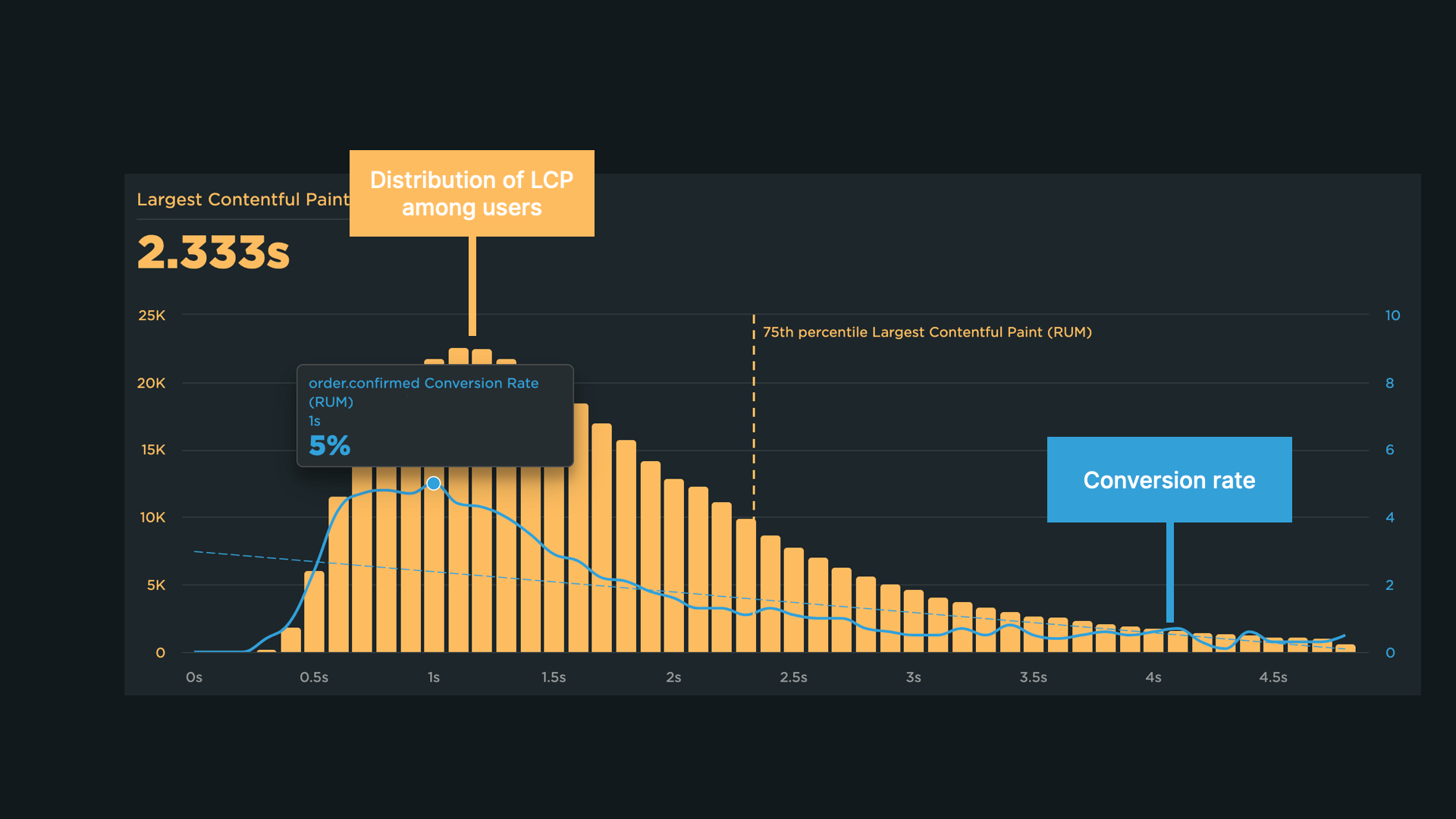
On our clients’ sites, LCP often correlates with conversion rate. We explore this in the Conversion Analysis.
What is an LCP Element?
In short, it’s the largest visible element on the page that is rendered during page load in the user’s main viewport. The LCP element is what the browser monitors to measure the time to render.
You can identify the LCP element in developer tools such as Lighthouse, Performance tab in DevTools, or the Web Vitals extension for Chrome. For details on finding and testing LCP (not only the LCP element), see my article Key Developer Skill: Testing Web Vitals in the Browser.
Possible LCP elements include:
<img>elements- an
<image>element inside an<svg> - a
<video>element with a poster image - a background image set with the
background-imageproperty (CSS gradients are ignored) - block-level elements containing text or other inline text descendants
Elements that cannot be LCP elements include:
- Elements with
opacity: 0or otherwise invisible to users - Elements that fill the entire viewport (these tend to be illustrative rather than content)
- Placeholder images with little content information (to guard against LCP hacks)
You can identify the LCP element in various devtools. See How to find the LCP element.
How the LCP Element is Evaluated
For proper evaluation and optimization, LCP is measured by the visible size of the element in the viewport. Cropped parts, portions hidden by overflow:hidden, and the element’s padding, margins, borders, and similar are not counted. If you want deeper details, check out the helpful article on web.dev.
Measuring LCP on Your Own Site
CrUX (Chrome UX Report) data are a reliable source for Core Web Vitals metrics. Use CrUX data for domain-wide or URL-specific insights.
Working with raw CrUX data can be technically challenging. Fortunately, we offer tools that process this data and present it in charts automatically—Pagespeed.cz and PageSpeed Insights.
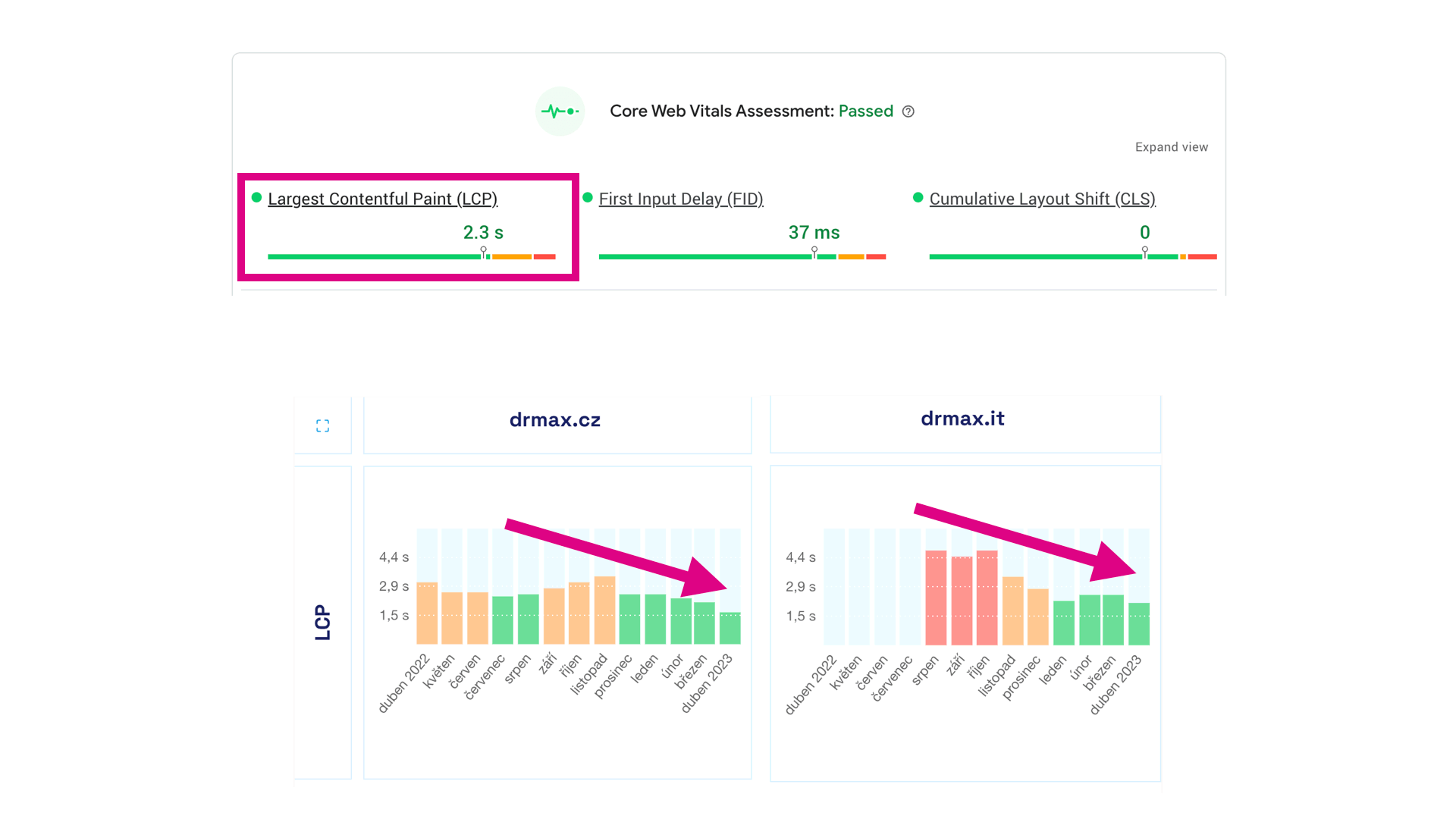 PageSpeed Insights provides the core LCP data. For time-based trends, try our tester.
If Chrome-only constraints are too limiting, you can always measure LCP yourself with Real User Monitoring (RUM) or by collecting data via JavaScript with the Performance Observer API.
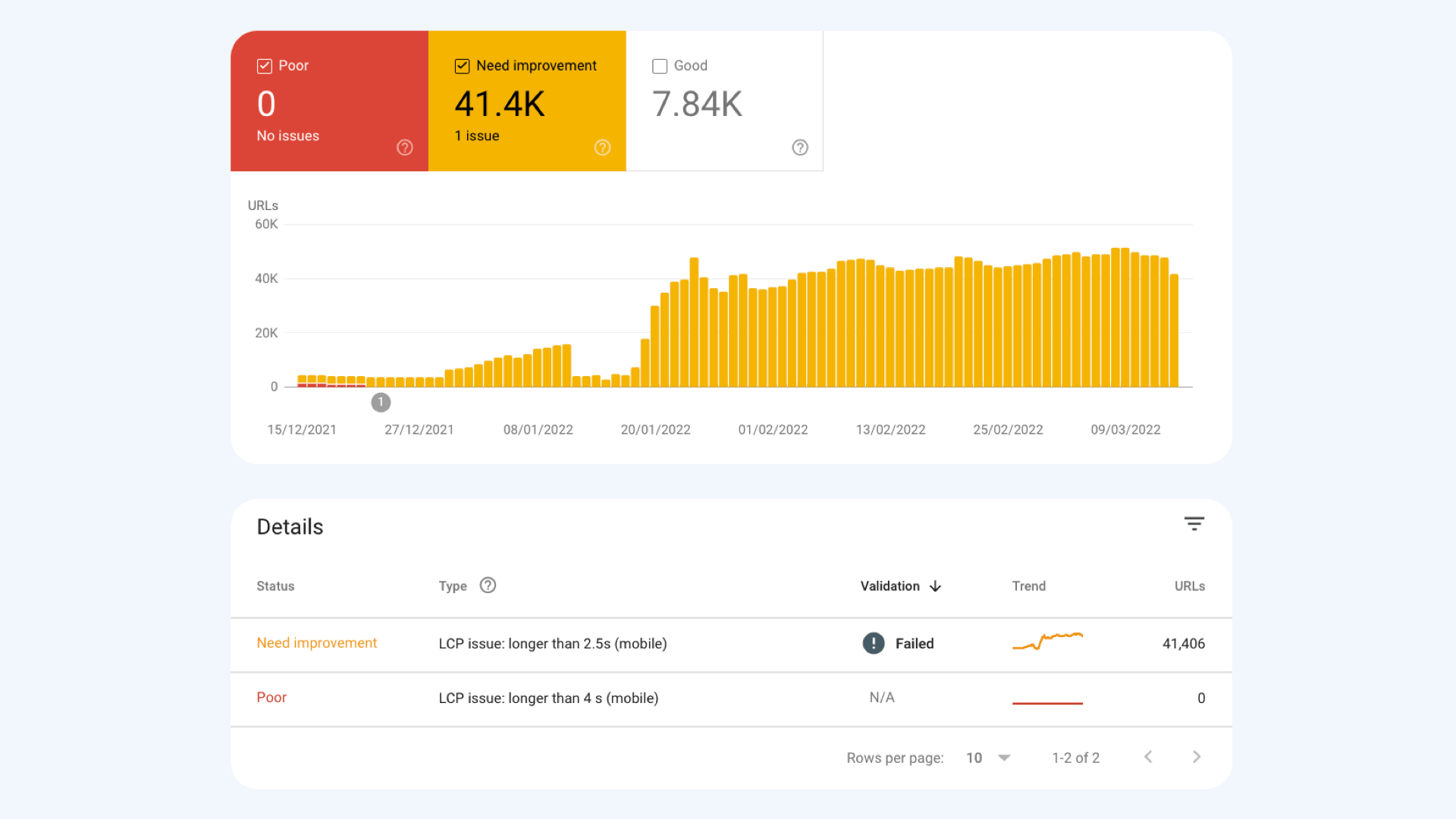 Google Search Console is one of the sources that reveals priorities for LCP optimization.
Synthetic measurements via tools like SpeedCurve, Google Lighthouse, and WebPageTest are another option.
We cover the differences between measurement approaches on a dedicated page: Synth vs CrUX vs RUM.
Chyby a možnosti optimalizace LCP
LCP is a fairly complex metric, influenced by many factors. The primary sources affecting first rendering include:
- Backend response time (TTFB)
- HTML size and complexity
- CSS size and other critical resources
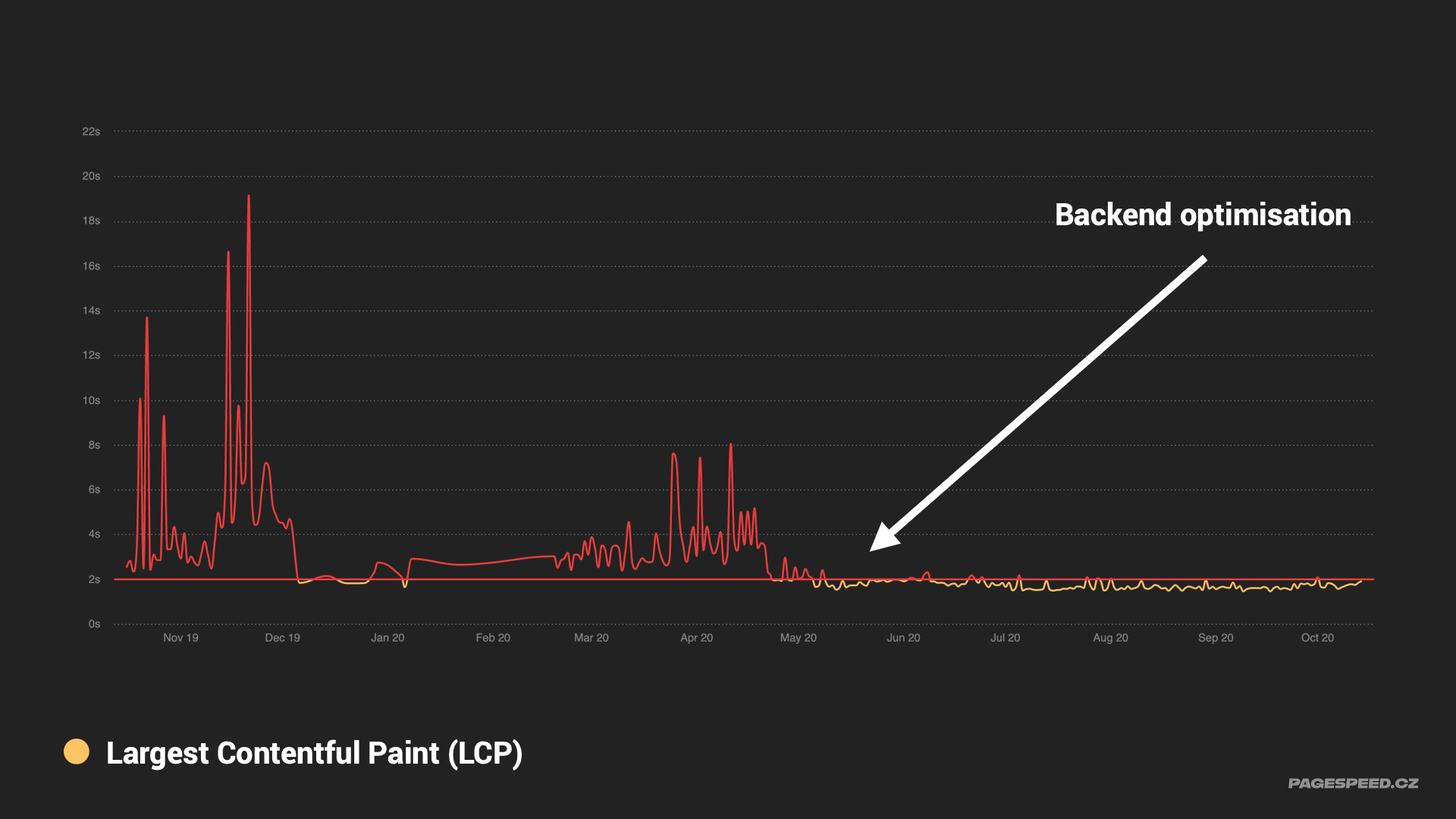 Backend time (TTFB) optimization often improves LCP.
LCP also accounts for asynchronous resources, such as images or web fonts, that can become the LCP element. LCP can be influenced by:
- Image format, file size, and data size
- Font file sizes
- Poster attribute on
<video>
In general, keep all timings and sizes as low as possible. Pro tip: use lazy loading for images and implement it properly.
Find more tips for image optimization on the web.
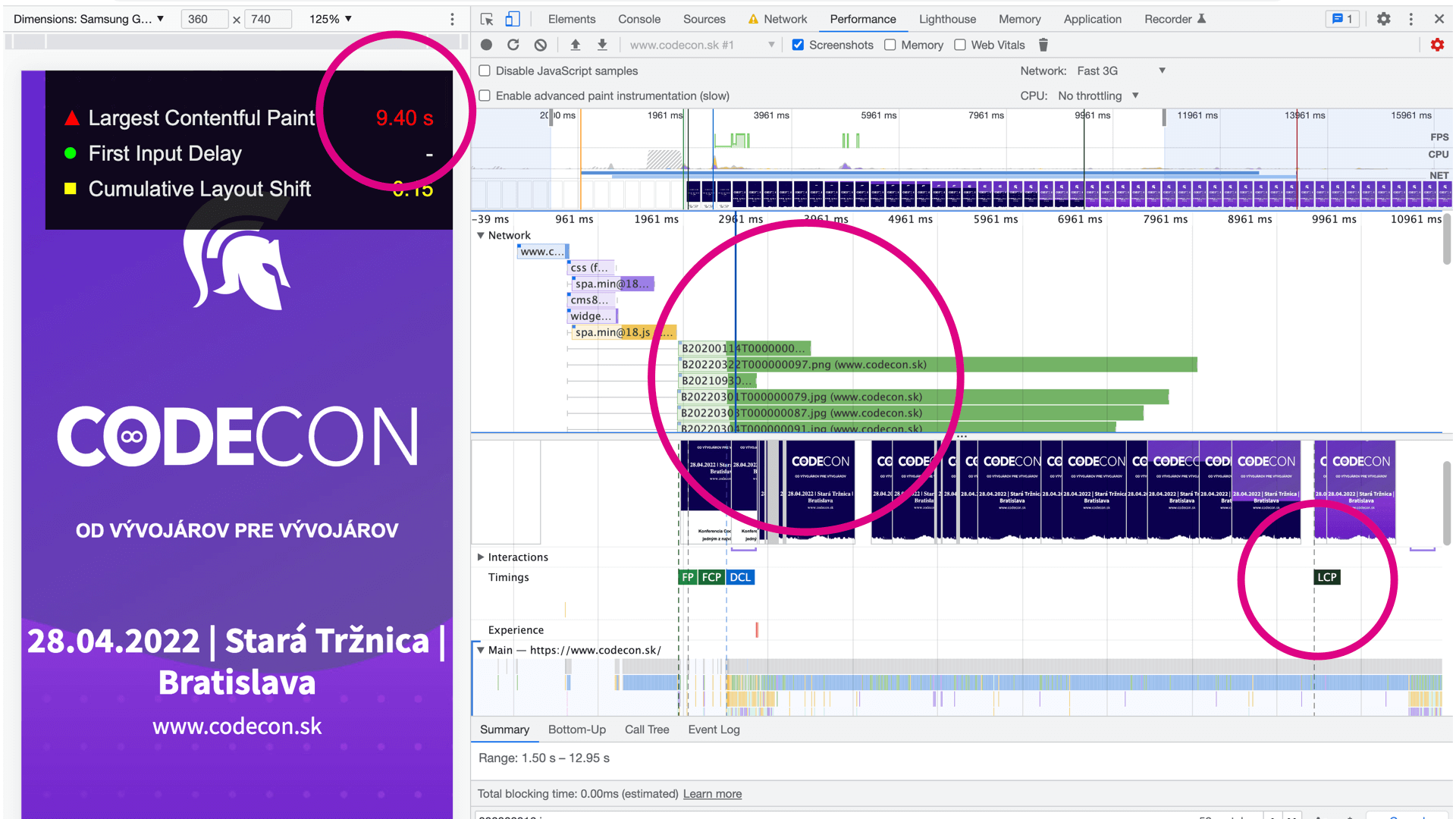 Lazy loading would help here. Most images (except the first) should be lazy-loaded to prioritize the first image that affects LCP.
LCP can also be improved with more advanced tweaks, outlined below:
Lazy loading can hurt LCP
Rule of thumb: images that aren’t lazy-loaded in the browser download first. Lazy-loaded images download later, even if they appear in the viewport. If you lazy-load an image that is also the LCP element, it will download much later, increasing the LCP time. Therefore, remove lazy loading from LCP elements and apply lazy loading to all other elements:

Fetch Priority speeds up downloads
A complex HTML structure or too many resources can delay the LCP element. The fetchpriority attribute can raise the priority of a selected resource and improve LCP. Use this technique with care and thoroughly test its impact:

Preload fonts used by LCP elements
If a text element is the LCP, ensure fonts load as quickly as possible. Use preloading for the relevant font slice that affects LCP:
See our article on LCP optimization.
What to Remember About LCP
- Largest Contentful Paint (LCP) measures how long it takes for the largest visible element to render.
- Recommended LCP values: ≤ 2.5 s; 2.5–4 s require improvements; > 4 s is unsatisfactory.
- LCP is a core part of Core Web Vitals, impacting user experience, bounce rate, conversions, and search rankings.
- When optimizing LCP, focus on speeding up loading of critical resources, using lazy loading appropriately, and leveraging fetchpriority to prioritize file downloads.
LCP is part of our unified speed metric—the PageSpeed.cz score (SPS).
We Have Years of LCP Optimization Experience
Our long-standing collaboration with Footshop.cz kicked off LCP optimizations. We tuned the shift from client-side rendering cached via a Service Worker to server-side rendering, delivering about 2.5× faster LCP on mobile.
Image credit: Unsplash.
Tags:MetricsCore Web VitalsLCPCrUX
PreviousInteraction to Next Paint (INP)NextLighthouse Score (LPS)