Speculation Rules API: The Path to Instant Page Loads
The Speculation Rules API lets you preload or even prerender a different page. This approach enables near-instant loading of the page a user navigates to, greatly improving the overall web experience.
Some of you may remember the older prerender (<link rel="prerender">), which didn’t gain wide adoption. In Chrome, version 109 introduces the Speculation Rules API with a new set of page-loading capabilities, and version 122 brings further improvements. Overall support is solid.
Instant loading will, of course, impact all Core Web Vitals metrics: faster loading improves LCP, keeping the page in memory helps layout stability (CLS), and it also speeds up interactivity (INP).
Prerender Under the Microscope
The basic Speculation Rules implementation is straightforward. Use the HTML tag <script type="speculationrules"> to define prerender rules in JSON. If you can’t modify HTML, you can deliver the rules via JavaScript or HTTP headers.
In the example below, you’ll see prerendering of a simple page using specific URLs:
<script type="speculationrules">
	{
		"prerender": [
			{
				"urls": ["next.html", "next2.html"]
			}
		]
	}
</script>
The Speculation Rules API options are far more flexible: you can use CSS selectors or apply a where condition. Another example shows pre-rendering URLs in advance without explicit listing, except for pages under /logout/*:
<script type="speculationrules">
	{
		"prerender": [
			{
				"source": "document",
				"where": {
					"and": [{ "href_matches": "/*" }, { "not": { "href_matches": "/logout/*" } }]
				},
				"eagerness": "moderate"
			}
		]
	}
</script>
Nevertheless, prerendering every link on a page isn’t a good idea, as it increases server load.
On mobile devices, CPU and memory can be heavily taxed. The balance for prerendering can be improved by the API’s other property, eagerness.
The Eagerness Attribute
Using eagerness, you can set different time windows during which speculative rules apply.
Options include:
immediate— immediate start as soon as the browser encounters your rules.eager— currently behaves like immediate, with future improvements placing it between immediate and moderate.moderate— starts prerendering when the user hovers a link for at least 200 ms (or onpointerdownif that occurs earlier, and on mobile devices where hover is not available).conservative— starts onpointerdown.
Note that Chrome may block running the Speculation Rules API under certain conditions. For example, when power-saving mode, data-saving mode, memory restrictions, or for pages opened in background tabs are active. Users can also disable prerendering in browser settings.
You can verify your rules directly in DevTools under the Application tab, in Background services, by selecting Speculation Loads:
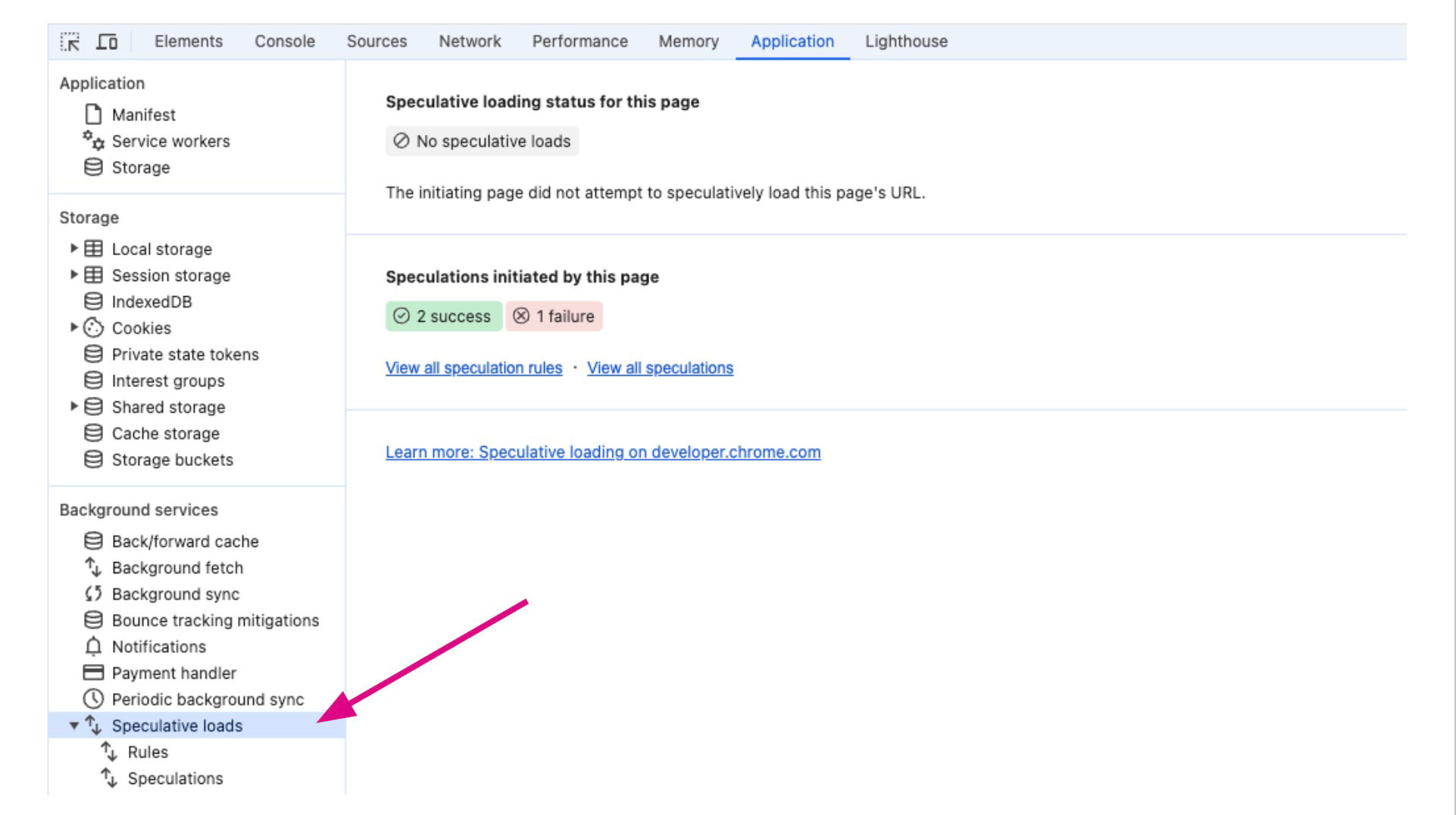 Testing Speculative loads in Chrome DevTools.
Speculation Rules and Analytics
It’s important to note that prerendered pages can skew analytics measurements. User interactions may not be recorded correctly if the page hasn’t actually loaded. We recommend updating your analytics code to reliably detect page activation.
Most GA-type analytics generally measure Speculation Rules correctly, but you should monitor when the page is actually shown to the user. Google covers this in their article.
Which Websites Benefit from Speculation Rules API?
Ideal candidates are content sites or e-commerce stores. When selecting pages for speculation, choose those with the highest likelihood that users will click. You can find such data in analytics tools like Hotjar.
For inspiration, consider applying speculative rules to:
- E-commerce category pages for the next pages in pagination.
- E-commerce checkout steps.
- Content sites’ homepage featuring the latest article.
Don’t forget the eagerness setting and start with a less aggressive option like moderate. As a general rule, use speculative rules sparingly, as they add server load. On mobile, they can also stress CPU and memory.
Our monitoring at PageSpeed.cz PLUS uses Navigation Types to track changes in the share of each navigation type. Prerender is one of the types, including prerendering via the Speculation Rules API.
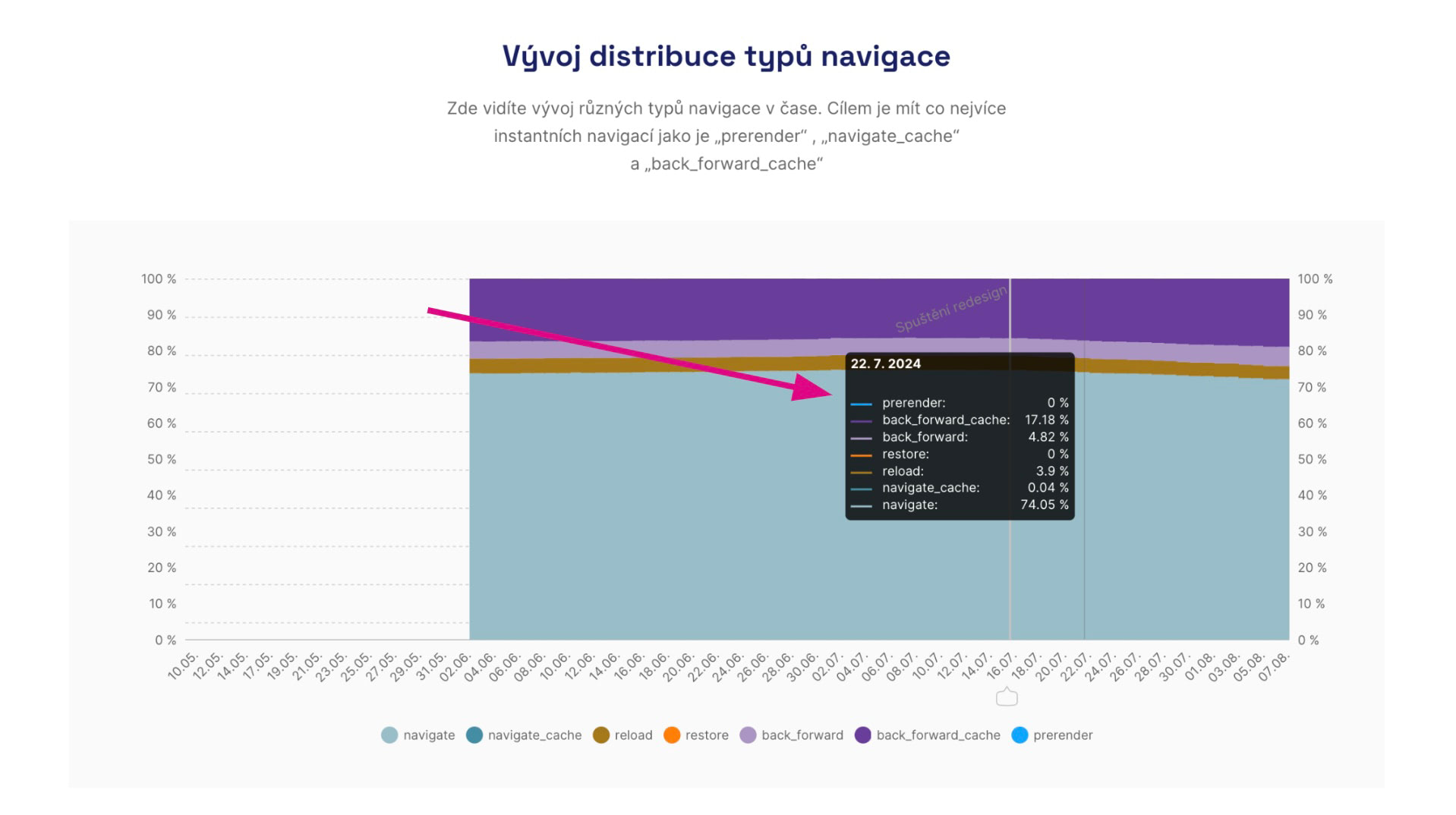 Overview of Navigation Types in PageSpeed.cz PLUS monitoring.