Speed Up React: 6 Proven Tips to Optimize Core Web Vitals
This article presents several optimization techniques to improve the metrics of Core Web Vitals on sites built with React. We’ll focus mainly on Interaction to Next Paint (INP), i.e., the speed of response to interactions.
Optimizing React-based sites is about smoothing long JavaScript tasks tightly tied to how React works under the hood and visible, among other things, in the Total Blocking Time (TBT).
Is a React site automatically fast? Not necessarily
React uses several smart tricks that help speed up websites and web apps.
It efficiently updates and renders only the components where data changes. The hooks system also guards against unwanted layout recalculations and layout thrashing.
So, is a React-built site automatically fast? The answer is: no.
Declarative components make code more predictable and readable, but careless state manipulation or too many components almost certainly leads to slow interactivity.
React is a tool like any other, and it depends on how well a developer knows it.
Now, here are the optimization tips we recommend based on our client work. How to keep React code manageable?
1) Shrink the DOM size
DOM size and its optimization are fundamentals. What isn’t in the DOM doesn’t get rendered, and the browser can relax.
In React this is twice as important. Fewer elements mean fewer components, meaning less JavaScript to download and process.
With SSR (server-side rendering) you also gain faster time-to-first-html and a smaller payload. Win-win for all.
Remove non-essential components from the DOM entirely and load them via lazy loading:
import { lazy } from 'react';

const MarkdownPreview = lazy(() => import('./MarkdownPreview.js'));
2) Create two versions of components: lightweight and full-featured
Even if a component or its content is important for SEO or accessibility, it doesn’t have to be fully visually rich on the initial render, especially if the component isn’t visible in the first viewport.
Dividing components into a lightweight and a richer version is particularly effective for repeating elements, such as landing pages, product listings, or other offers, as shown in the image:
 A component that on page load provides only data important for SEO. The richer variant is revealed as the user viewport reveals the component.
3) Use Suspense
The [Suspense] tag is primarily used for showing placeholder content while lazy components load.
Few know its hidden superpower: Suspense enables concurrent rendering. This lets you split the page into important and less important parts.
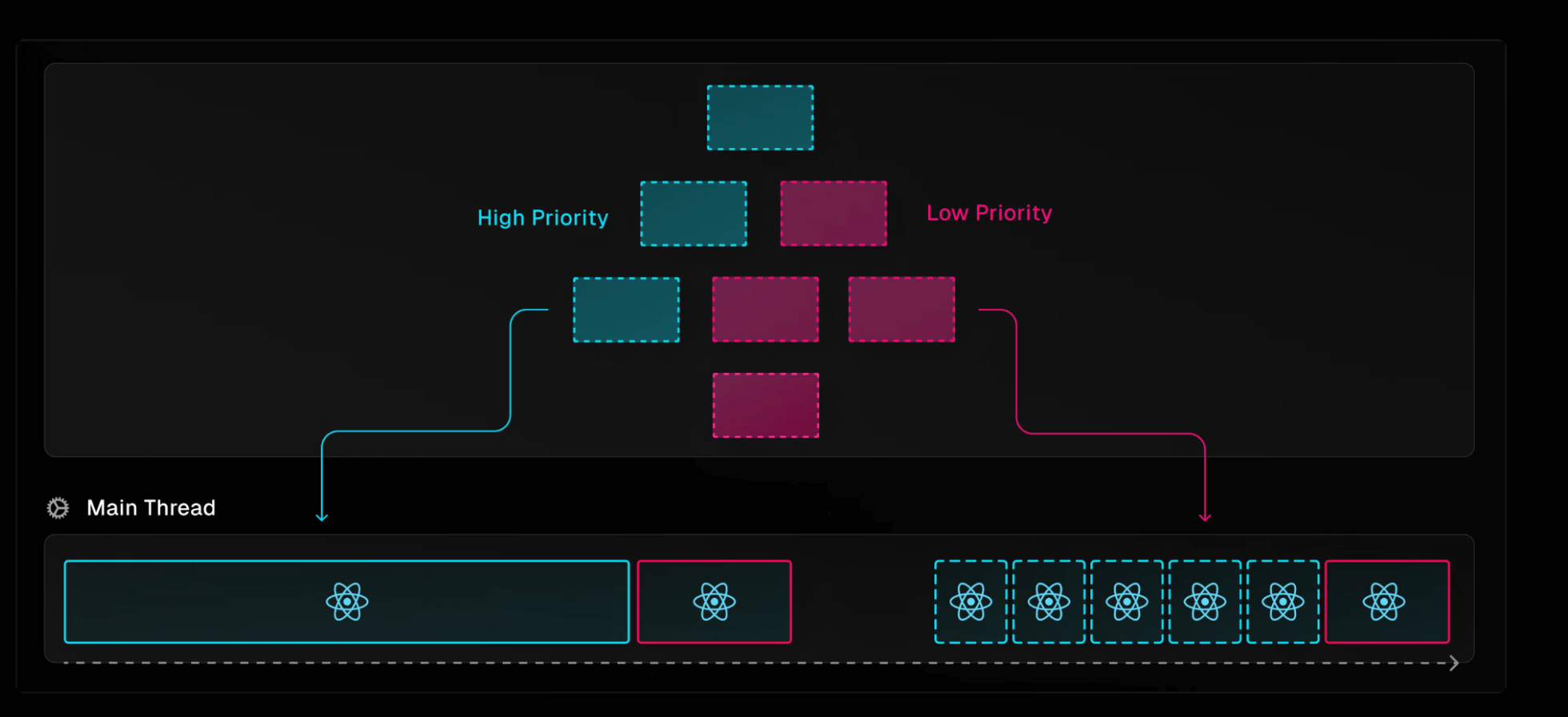 The component tree split with the <Suspense> tag. Red components are marked as less important.
In SSR scenarios the effect of Suspense is crucial.
Hydration is the process of reviving server-rendered markup on the client. It’s typically a long-running JavaScript task, so Suspense helps.
But beware: never wrap a large block with Suspense. Save it for smaller parts, and avoid wrapping elements visible in the initial viewport. Otherwise it may backfire.
4) Be mindful of hydration errors
At the end of hydration, React checks whether the client DOM matches the server’s output. If not, it reports an error, and React will re-render components on the client, hurting performance and potentially delaying LCP.
5) Be cautious with useEffect()
useEffect is not always asynchronous. When a user action triggers input, all React code runs synchronously, including effect hooks.
If you use a hook to delay work until the next render, use setTimeout or another method to defer the work.
useEffect(() => {
	// Defer work to a separate task
	setTimeout(() => {
		sendAnalytics();
	}, 0);
}, []);
6) Server Components
Server Components are a relatively new feature in React. They let you write components that aren’t sent to the client JavaScript but render on the server.
This means the client receives pre-rendered content and doesn’t need to run extra JavaScript to render or hydrate.
Conclusion
React is a tool. The key is knowing it well. We strongly recommend the series React Internals Deep Dive.
Also check out other methods for optimizing INP.
Tagy:INPJavaScriptReact