Cookie Banners and Website Speed
Cookie banners deployed without speed optimization pose a significant risk to site speed—and to Web Vitals metrics. In this article we share the lessons we’ve learned while working with our clients.
You’ve probably heard that cookie banners (also known as CMP banners) will be mandatory on most sites due to legislative changes. We won’t dive into the legislation (that’s covered by Petra Dolejšová) or design (discussed by Ondřej Ilinčev); we’ll focus on how not to wreck speed with their implementation.
First, here’s the champion—the worst possible cookie banner that will reliably ruin your metrics.
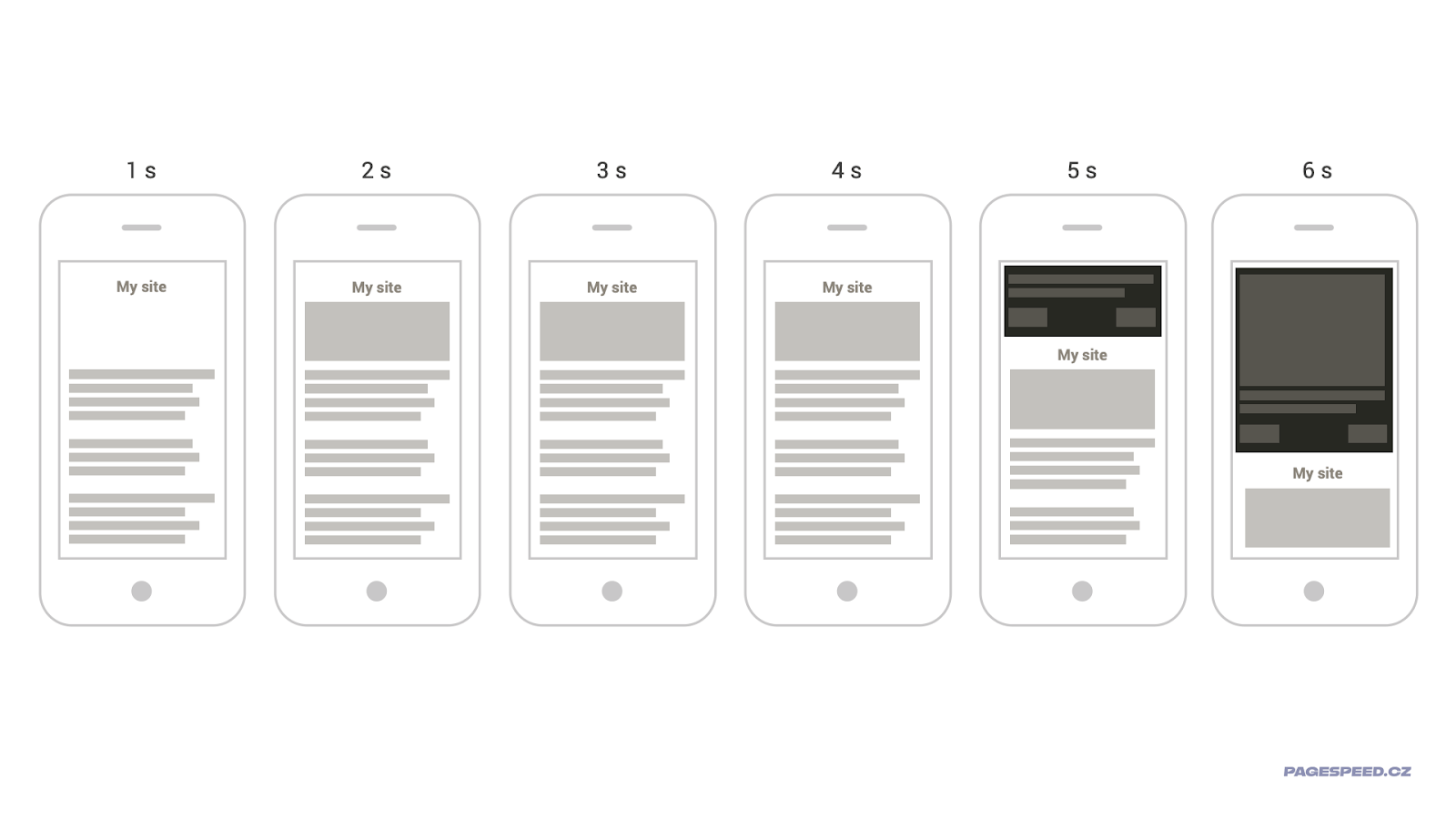
That’s the one, speed-killing champion! Nothing happens for five seconds. Then the banner starts pushing content down very slowly, and even more once a large image renders inside it.
Why is that so bad for speed? Think about it for a moment—you’ll likely figure it out.
Here’s what you’re risking:
- It loads late, just as users are ready to consume page content.
- It shifts content and severely degrades the CLS metric. In this case, CLS could jump to more than five times the maximum value.
- Finally, the banner renders an image. Ideally a little later than the banner itself, but it’s typically large and poorly optimized—often larger than any other element on the page. This creates perfect conditions to ruin the LCP metric.
There are plenty of speed-killing champions on the web. And as you guessed, it isn’t always about cookie banners…
Now let’s look at concrete issues cookie banners can cause for metrics.
Metrika LCP: Render as early as possible
Among developers there’s a myth that content like cookie banners should be delayed as much as possible since it isn’t the main content. This is a major mistake. A cookie banner is, from the user’s perspective, the primary and most important content. Ideally, they should read it, acknowledge it, and then proceed to your site.
Moreover, if you designed the banner to include large elements (long texts or images), it can become an [LCP element], which is what Largest Contentful Paint is based on.
So delaying the banner can also delay LCP.
Look at the image below—two sites, both large and technically complex. For their developers, rendering cookie banners in time is challenging, even with significant effort. How does it look to users on slow connections?
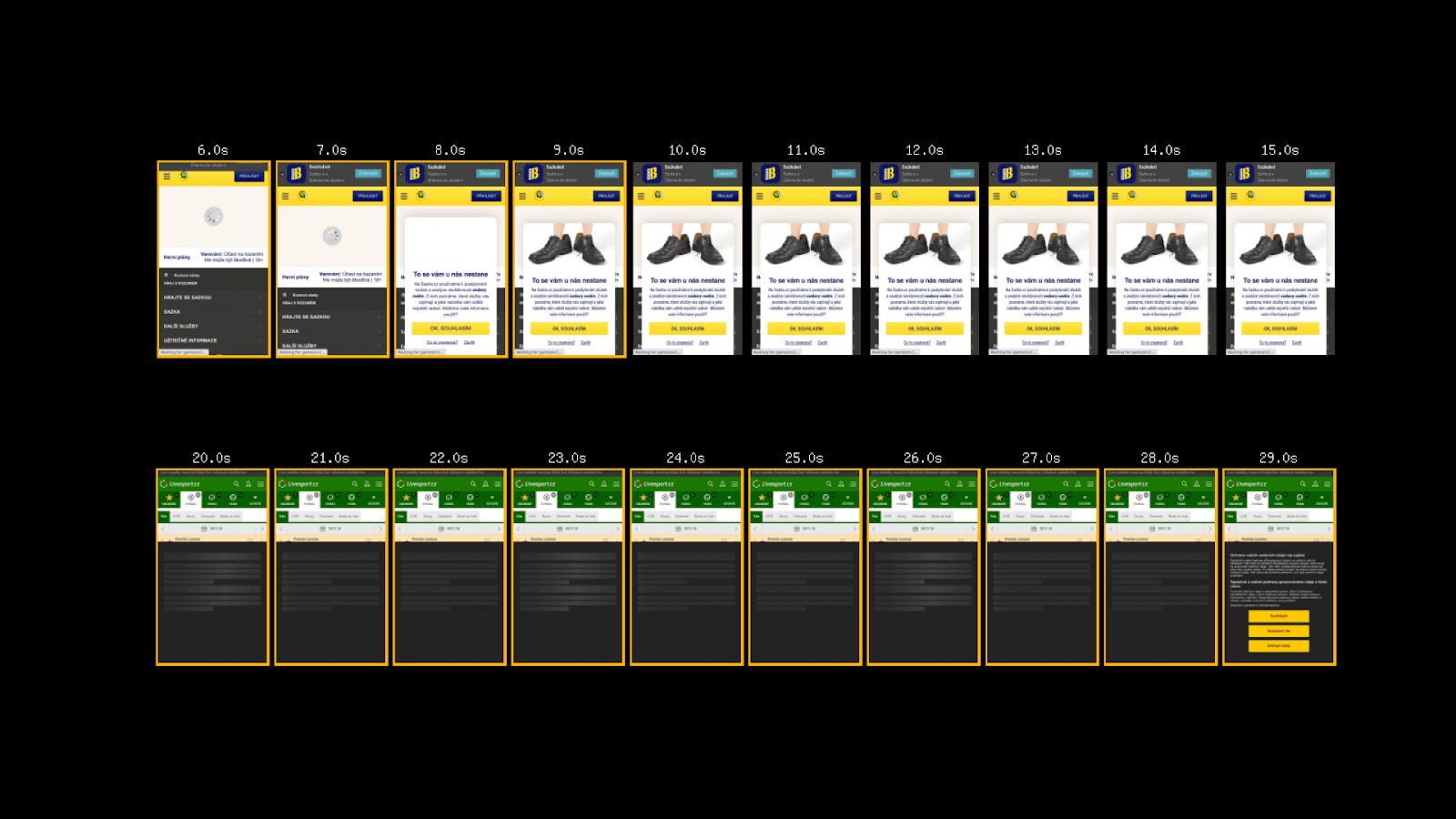 In both cases, LCP is calculated from the banner’s content. In the first, the banner appears after the page layout, and then the image has to load.
The second variant is slightly better. On slow connections you’ll see a skeleton that reserves space before the banner content loads.
For more on how to reserve space for components, see this article.
Metrika CLS: Don’t shift, don’t animate
You’ve probably heard that CLS is caused by unexpected layout shifts. In our worst-banner example, the biggest issues for CLS (and users) come from poor design or implementation.
When it comes to CLS, also beware of how you implement solutions. For one client, implementing Google Funding Choices tripled CLS:
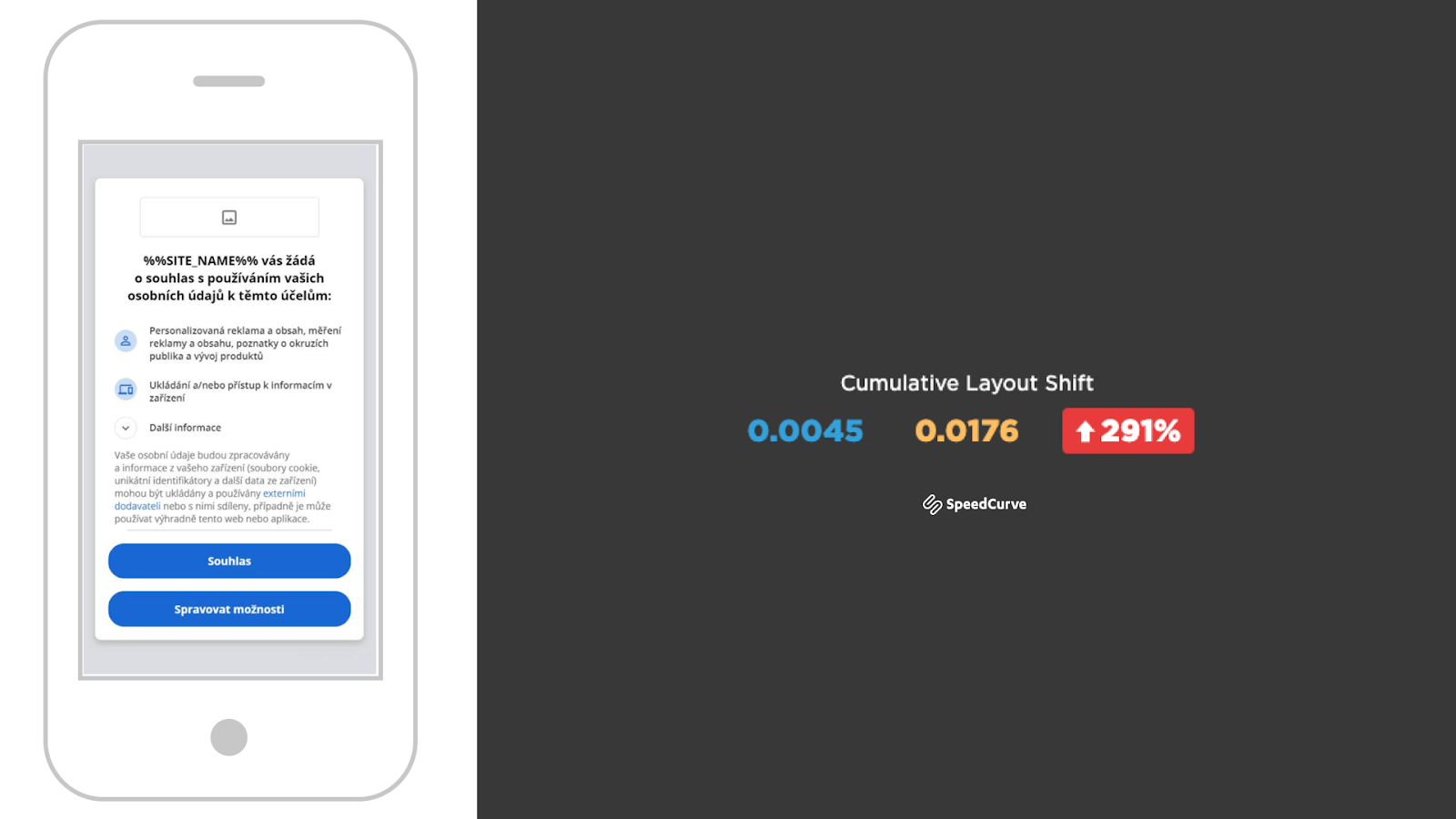
We’ve confirmed on real user data (Web Vitals from the Chrome UX Report) that the impact isn’t always huge, but it’s a clear warning against blind adoption of external solutions.
Test. Measure. Test. And measure again. Perhaps in our own web speed tester.
With CLS, also watch out for animations. You should animate with CSS properties like transform. If some solutions keep animations enabled, they’re often implemented poorly and worsen CLS. A notable poor example is OneTrust (formerly Optanon).
INP/TBT: Measure the impact on browser performance
The JavaScript-driven [Interaction to Next Paint] metric (or [Total Blocking Time] in synthetic testing) isn’t typically worsened by cookie banners. But there are exceptions.
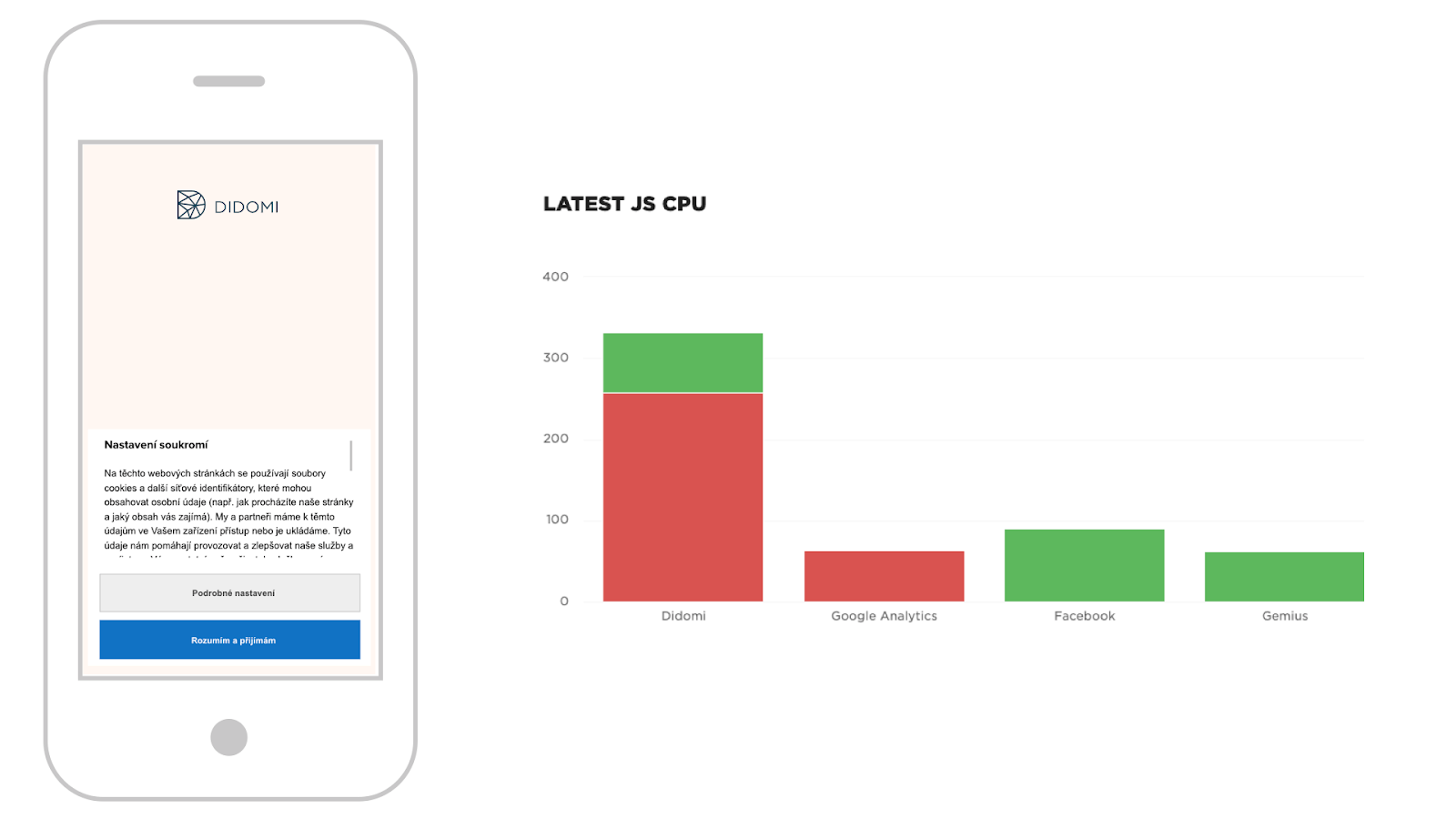
Be aware of solutions like Didomi which on slower mobile devices can block the main browser thread up to four times the value of Google Analytics. For typical sites it’s just a nuisance, but for sites that heavily render with third-party JS (content-heavy sites with ads) this can worsen INP for users.
Note on measurement
We often encounter the view that third-party components shouldn’t be included in speed measurements because developers aren’t responsible for them.
But a web user doesn’t see a site without third-party components. You have to accept cookie banners and other third-party elements and measure the real state.
Cookie banners present a special case: some users see the site with it, others without. We therefore recommend testing both variants.
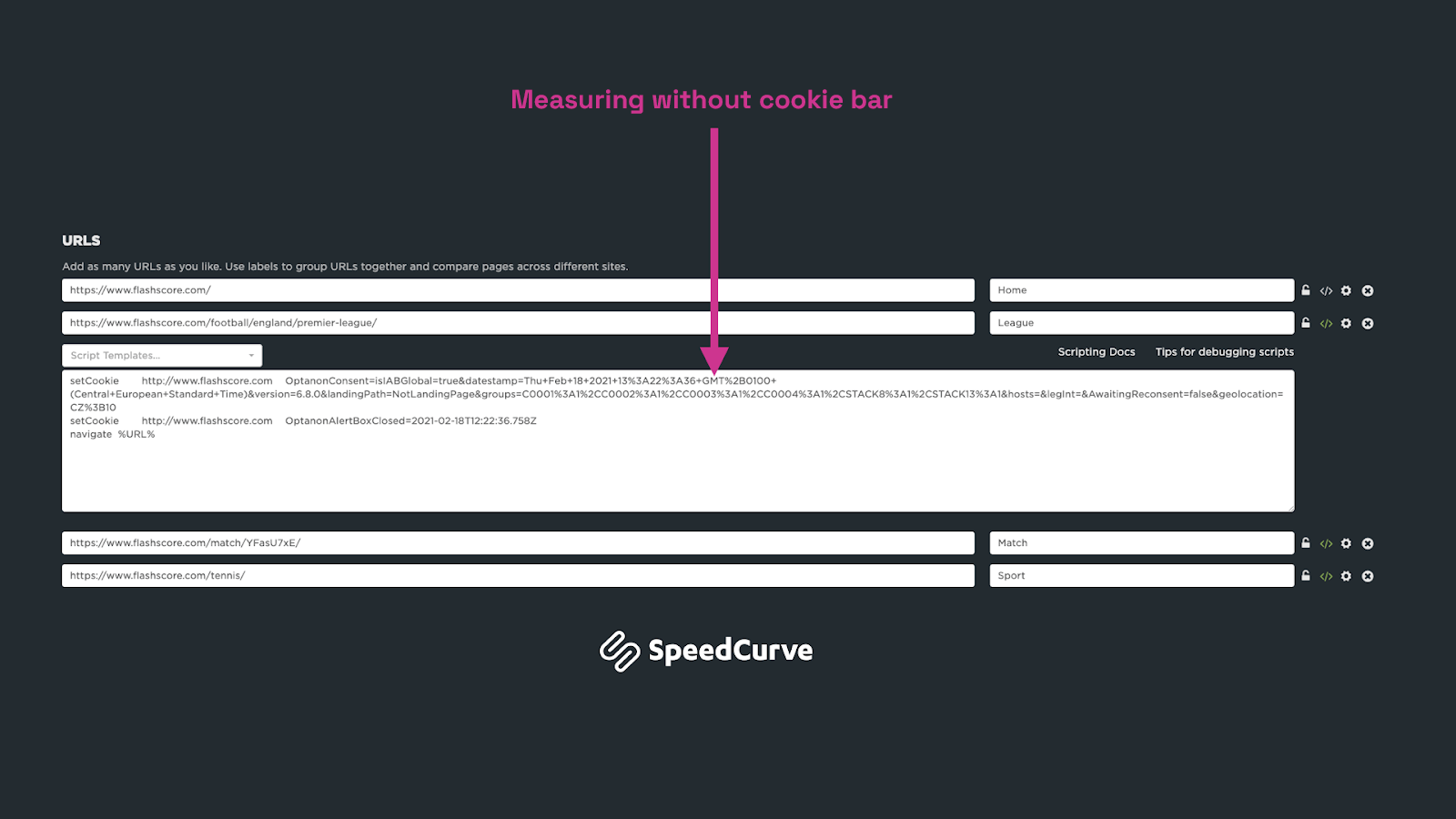 The image shows SpeedCurve settings for Livesport, where we test only the homepage with the cookie banner. Technically this is handled via [WebPageTest scripting]. You can implement a similar approach, e.g., with Lighthouse User Flows.
Recommendations for your implementation
Let’s sum up:
- Load the cookie banner as early as possible.
- If possible, avoid large elements inside the banner that could be LCP elements.
- Be mindful of animations and sliding the banner in from the top.
- Test the speed impact of chosen solutions.
- Measure the impact with and without the cookie banner.
Final video
If you prefer audio, here’s my recording from Pavel Ungr’s webinar on cookie banners.
We can help with implementation and optimization in just a few hours of consulting—feel free to reach out at: martin.michalek@pagespeed.cz.
Wishing you fast websites—in spite of cookie banners.